You might be wondering if your LinkedIn profile is enough on its own. It's a fair question. While a killer profile is non-negotiable, knowing how to upload a resume in LinkedIn gives you a serious edge. It lets you present a tailored, high-impact version of your story for a specific role.
Think of it this way: your profile is the big, comprehensive narrative of your career. Your resume is the focused highlight reel you send to the director.
Why a Resume on LinkedIn Is Still a Game Changer
Your LinkedIn profile is a powerful tool, but it's a general one. It’s built to tell your entire professional story, show off recommendations, and list every single skill you've ever picked up.
A separate resume serves a much more strategic purpose. It's your secret weapon for targeting a specific job with laser precision.
While your profile gives a bird's-eye view, your resume is the document you tweak for each and every application. This is your chance to mirror the exact language of a job description, spotlighting the skills and experiences that matter most for that role. This is absolutely critical for getting past Applicant Tracking Systems (ATS) and grabbing a recruiter’s attention.
A well-crafted resume, like the ones you can build with StoryCV, zeroes in on quantifiable achievements and impactful results that might get buried in the broader context of a LinkedIn profile.
The Recruiter's Perspective
Hiring managers and recruiters look at both. They scan your LinkedIn profile to get a feel for your professional persona, your network, and what you’re talking about online. Then, they turn to your resume for the hard-hitting details relevant to the role they need to fill.
A tailored resume is a direct response to a job posting. It says, "I didn't just see your opening; I understood what you need, and here’s exactly how I can deliver." That level of customization signals genuine interest and professionalism.
This two-pronged approach gives them the complete picture. Your profile offers social proof and the wider story of your career. Your resume provides the focused evidence they need to move you to the "interview" pile. Having a polished, targeted resume ready to go ensures you meet their expectations at every turn.
Maximizing Your Visibility
Ultimately, adding a resume is about boosting your chances of being seen by the right people. With over 1.2 billion members, LinkedIn is a crowded place. To stand out, you have to use every tool in the box.
Data shows that profiles with completed sections and at least five skills get up to 17 times more views. This just underscores how vital it is to provide comprehensive information. You can dig deeper into how a complete profile drives engagement by checking out these LinkedIn marketing statistics. Uploading a resume is a key part of that completeness, making sure recruiters have everything they need to see you as a serious candidate.
Choosing Your Strategy for Adding a Resume
Figuring out the best way to add your resume to LinkedIn isn't just a technical step—it's a strategic move. Your approach should change depending on whether you're actively hunting for a job or just passively open to new roles. It also comes down to how much you want to protect your personal information.
Think of it this way: putting your resume in your profile’s Featured section is like planting a "For Hire" sign on your front lawn. It's a public announcement to everyone who stops by. Attaching it to a specific job application, on the other hand, is like sending a carefully crafted letter directly to a company you want to work for. Each method has a very different purpose.
Public vs. Private: What's the Right Move for You?
The most visible option is to add your resume directly to your profile's Featured section. This is a great play if you're an active job seeker. It puts your qualifications front and center for any recruiter or hiring manager who lands on your page, making it dead simple for them to see what you bring to the table.
But there's a catch. This method makes your resume a public document. Because of that, it's absolutely critical to strip out personal contact details like your home address, email, and phone number. If a recruiter is interested, they can easily reach you through a LinkedIn message.
The more common—and private—method is to attach your resume directly to job applications. When you hit that "Easy Apply" button, LinkedIn lets you upload a resume just for that role. This gives you total control, making sure only the hiring team for that specific job sees your document.
This is also the perfect strategy for tailoring your resume. You can tweak your resume with keywords from the job description before you upload it, which is essential for getting past those pesky Applicant Tracking Systems (ATS).
Comparing LinkedIn Resume Upload Methods
This table breaks down the main ways to add your resume to LinkedIn, helping you pick the best strategy for your job search.
| Method | Best For | Visibility | Privacy Control |
|---|---|---|---|
| Featured Section | Active job seekers wanting maximum exposure. | Public. Anyone viewing your profile can see it. | Low. Your resume is fully public unless you remove contact info. |
| Easy Apply Attachments | Targeted applications and tailoring your resume for specific roles. | Private. Only the hiring team for that specific job sees it. | High. You control who receives your resume. |
| General Job Settings | Saving a default resume for quick applications. | Private. Used only when you apply for jobs. | High. Not publicly visible on your profile. |
Ultimately, using a mix of these methods is often the smartest approach. A public, general resume in your Featured section can attract inbound interest, while private, tailored resumes give you the edge when you apply for your dream job.
Managing Multiple Resume Versions
If you’re applying for different kinds of roles—say, a Project Manager and a Product Owner—you're going to need more than one version of your resume. Luckily, LinkedIn lets you save up to four of your most recent resumes when using Easy Apply. This makes it a breeze to pick the right one for each application.
This simple flowchart helps visualize the decision: is your profile strong enough on its own, or do you need a tailored resume to make your case?
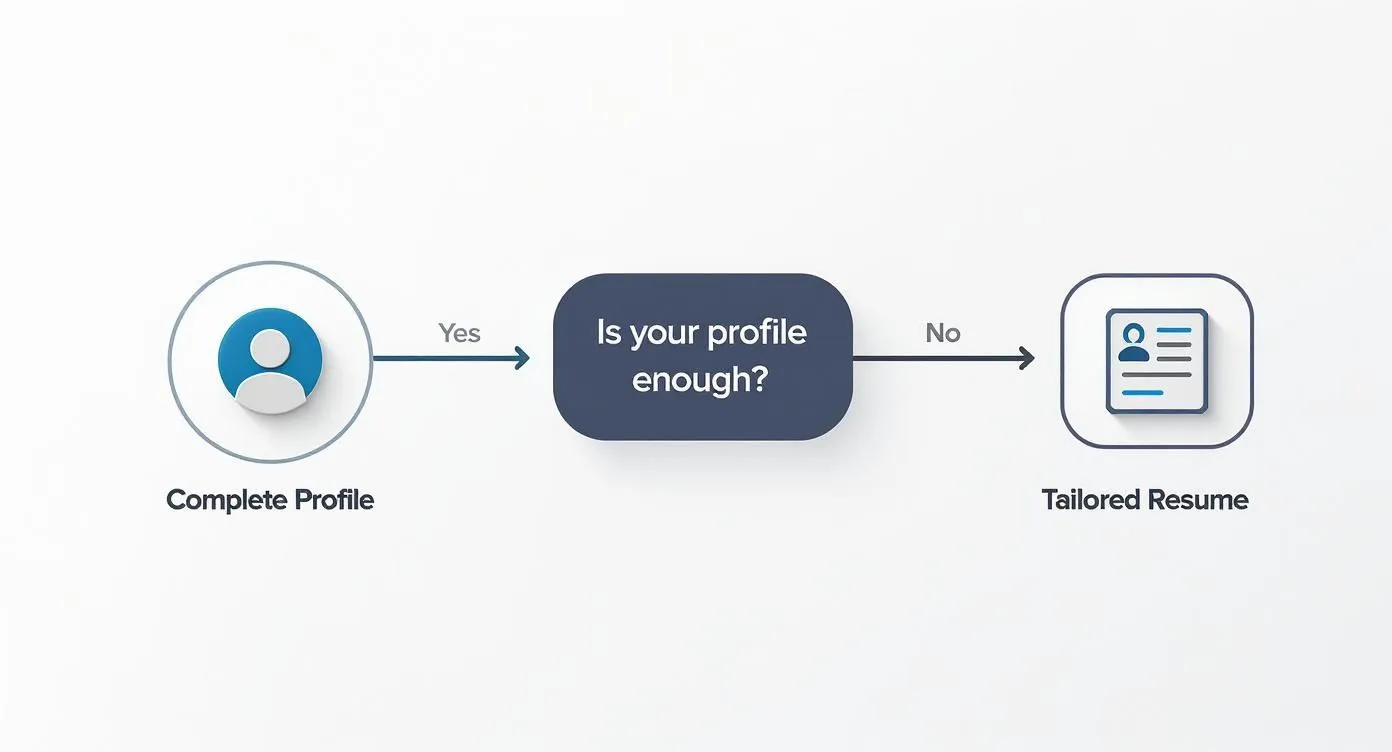
The flowchart makes it clear: a killer profile is your foundation, but a tailored resume is non-negotiable when your general profile doesn't speak directly to a job's specific needs. For those moments when you need to tell a powerful, focused story, understanding what a resume writer does highlights just how important strategic storytelling is. By choosing the right strategy, you can make LinkedIn's features work for you, not against you.
Featuring Your Resume on Your LinkedIn Profile
Pinning your resume to the Featured section of your profile is a power move. Think of it as putting up a billboard right on your main profile page. It tells every visitor—from recruiters to potential clients—that you’re serious and ready to talk. This is prime real estate for grabbing immediate attention.
When you feature your resume, you make it incredibly easy for hiring managers to get the full story without having to ask. It’s a proactive step that screams confidence. If you're actively on the hunt, this kind of visibility can seriously cut down the time it takes for someone interested to go from viewing your profile to actually reaching out.
Navigating to the Featured Section
Getting your resume into this prominent spot is simple. It all starts from your main profile page.
First, head over to your profile. Look just below your headline and dashboard for the "Add profile section" button. Clicking this opens up a whole menu of ways to beef up your profile.
From there, you’ll want to:
-
Expand the Recommended dropdown.
-
Select Add featured.
-
A new window pops up. Click the plus (+) icon and choose Add media from the list.
This will open your computer's file explorer, letting you find and upload your resume document directly.
This is exactly where you'll find the "Add media" option after you click to add a featured item.
As you can see, the interface is pretty intuitive. It guides you to upload posts, articles, links, or media files—like your resume.
Crafting a Compelling Title and Description
Once you’ve picked your file, don't just hit "Save" and call it a day. LinkedIn gives you a spot for a Title and a Description. This is your chance to frame your resume and make people want to click on it.
A generic title like "Resume" is a huge missed opportunity. Be specific and show the benefit right away.
Pro Tip: Your title should be a summary of your professional identity. Instead of "John Doe Resume," try something like "John Doe - Senior Product Manager | SaaS & Fintech." It instantly tells viewers your specialty.
The description is where you can add a little more flavor. A great one might read: "A detailed look at my experience leading cross-functional teams to launch successful B2B software products. Highlights include driving a 25% jump in user engagement and helping secure $1.5M in Series A funding." This short pitch is what entices the click.
Why Your File Format Matters
The format of your resume is more important than you'd think. The answer is always PDF. No exceptions.
Here’s why a PDF is non-negotiable:
-
Universal Compatibility: A PDF looks the same everywhere. It doesn't matter if a recruiter opens it on a Mac, a PC, or their phone—your careful formatting stays intact.
-
Professional Appearance: Word documents (.doc or .docx) are notorious for formatting shifts between devices. One wrong move and your resume looks sloppy and unprofessional. A PDF is a polished, final product.
-
Security: PDFs are more secure and prevent anyone from making accidental edits.
Uploading resumes to LinkedIn is now a standard part of the hiring game. With over 11,000 members applying for jobs on the platform every minute, recruiters are swimming in applications. The resume upload feature helps them standardize how they review people, making a clean PDF essential for a good first impression. You can learn more about the high volume of applications on amraandelma.com.
Attaching a Resume to Specific Job Applications
Putting a resume in your profile’s Featured section is a great public move, but the real workhorse of any job search is attaching tailored resumes to specific applications. This is where you shift from broadcasting your skills to actively targeting the roles you want. Frankly, it's the most common and effective way to use your resume on LinkedIn.
When you attach your resume to an application, it's a private exchange. Only the hiring team for that specific role ever sees it. This gives you the freedom to tweak your resume for each job description before hitting "submit"—a crucial strategy for getting past the Applicant Tracking Systems (ATS) and making a direct case to a human reviewer.
This focused approach also keeps your information private. You control exactly who sees your detailed work history, so you don't have to scrub your phone number or email from a document that’s open to the public.
The Power of Customization for Each Role
Let’s be clear: never use a one-size-fits-all resume. Every job application is a fresh chance to show a company you're the perfect fit for their specific needs. Before you even think about applying, tear apart the job description. Look for keywords—the exact skills, responsibilities, and qualifications they mention—and weave those terms naturally into your resume.
For example, if a Marketing Manager posting keeps mentioning "SEO strategy," "content funnels," and "lead generation," your resume better reflect that language. A generic document will miss these nuances and get tossed out by an ATS before a person ever sees it. This is where a tool like StoryCV becomes so valuable; it helps you frame your impact using the language that resonates with both algorithms and recruiters.
Your goal isn't just to list your past duties; it's to present a direct solution to the company's problem. A tailored resume immediately shows a hiring manager that you've done your homework and understand what they're looking for.
This small effort signals serious interest and professionalism, immediately setting you apart from the candidates who just spray and pray with the same document.
Using the Easy Apply Feature
LinkedIn's Easy Apply button is a lifesaver, but its convenience can be a trap if you’re not careful. When you find a job with this option, clicking it opens a pop-up window.
Here’s how it usually goes:
-
First, you'll confirm your contact info is correct.
-
Next comes the most important part: the resume upload. You’ll see an "Upload resume" button. This is your moment to attach that perfectly tailored document you just prepared.
-
LinkedIn will also show you up to four of your most recently used resumes. If you’ve applied for a similar role, you can select a file you’ve already uploaded. Just be absolutely sure you’re choosing the correct version for this specific job.
-
Finally, you might have to answer a few role-specific questions before you can review and submit.
Because this feature is built for speed, it's vital to have your customized resume ready to go before you even click "Easy Apply."
With a staggering 101 job applications submitted on LinkedIn every second, the competition is intense. The resume you upload is your ticket to getting noticed. Both LinkedIn's own algorithm and the company's ATS scan these documents for keywords long before a human does. If you want to be one of the six people hired every minute through the platform, tailoring your resume isn't optional—it's essential. You can find more stats on LinkedIn's hiring velocity on kinsta.com.
Optimizing Your Uploaded Resume for Recruiters
Just getting your resume onto LinkedIn isn't enough. The real work is making sure it gets noticed. Your document has to be sharp enough to impress two very different audiences: the automated screeners (the ATS) and the human recruiters holding the keys to your next job.
Think of it like a two-part audition. First, you have to get past the machine. Then, you need to grab a hiring manager’s attention in a matter of seconds. Here’s how to make sure your resume is ready for both.
Align Your Resume with Your LinkedIn Profile
This is non-negotiable. Consistency between your resume and your LinkedIn profile is critical. If a recruiter sees mismatched job titles, conflicting employment dates, or different company names, it’s an immediate red flag. It makes you look careless at best, and dishonest at worst.
While your LinkedIn profile can be a bit more detailed, the core facts must match perfectly. For example, if your resume says "Senior Marketing Specialist" but your profile says "Marketing Lead," a recruiter will pause. Make sure every key detail is identical to tell a coherent and trustworthy professional story. It’s a simple check that builds instant credibility.
Weave in Keywords and Use a Professional File Name
To get past that first filter—the Applicant Tracking System—your resume needs to speak the same language as the job description. Go through the posting and pull out the essential skills, tools, and responsibilities. Then, work those keywords naturally into your resume.
-
Skill Matching: If the role requires "Agile methodologies" and "Jira," those exact phrases need to be in your skills or experience sections.
-
Action Verbs: Ditch passive phrases. Use powerful, role-specific verbs that mirror the job’s duties, like "orchestrated," "engineered," or "quantified."
Even the file name makes a first impression. A generic name like resume_final_v2.pdf just looks amateur.
A clean, professional file name is a small detail that signals organization and attention to detail. Always use a clear and simple format like FirstName-LastName-Resume.pdf.
This simple tweak makes it easier for recruiters to manage your file and immediately identifies you. It's a tiny step that communicates professionalism before they even open the document.
Proofread and Choose the Right Format
Finally, typos and formatting errors can kill your chances before you even start. Read your resume multiple times—I always recommend reading it out loud to catch awkward phrasing and mistakes. Better yet, have a friend give it a once-over for a fresh pair of eyes.
Always, always save and upload your resume as a PDF. This locks in your formatting, ensuring it looks exactly how you designed it on any device, from a recruiter’s desktop to a hiring manager's tablet. A Word document can get scrambled, making all your hard work look sloppy.
For those just starting their careers, looking at a professional student resume template with real examples can give you a solid foundation and help you avoid these common pitfalls from the get-go.
A Few Common Questions About LinkedIn Resumes
Figuring out the ins and outs of resumes on LinkedIn can feel like walking a tightrope. You want to be visible, but you also want to protect your privacy and look like you know what you're doing.
Let's clear up some of the most common questions job seekers have. Getting these details right is the key to using the platform strategically, making sure your resume works for you, not against you.
Can Recruiters See My Resume if I Add It to My Profile?
Yes, but only if you add it to the Featured section of your profile. Think of this as your public portfolio—anyone who lands on your page can see it and download it. This is a great move for active job seekers who want maximum exposure.
But if you’d rather play your cards closer to your chest, only attach your resume directly to individual job applications. When you do it this way, only the hiring team for that specific job will see it. You keep total control over who gets your information.
How Do I Update or Remove an Old Resume on LinkedIn?
Keeping your resume fresh is non-negotiable. If you have one pinned to your Featured section, you have to delete the old one first. Just click the little pencil icon on the item, hit 'Delete,' and then upload your new, updated version. Simple.
For resumes you've saved for job applications, the process is a bit different. You'll need to dig into your settings:
-
Head to Settings & Privacy.
-
Find the Job application settings section.
-
From there, you can manage your stored resumes and delete any old files.
I'd recommend cleaning this out every couple of months. It’s a small bit of housekeeping that prevents you from accidentally sending out an old version when you’re in a hurry.
Making sure your most recent resume is always ready to go prevents that last-minute scramble and ensures you're showing off your latest skills and wins. It's a small organizational step that pays off big time.
Should My LinkedIn Profile and Resume Be Identical?
They should be consistent, but absolutely not identical. Think of them as two different tools for the same job: telling your career story.
Your resume is a sharp, tailored document. It’s often optimized for a specific role and built to get past the automated screeners. In fact, many job seekers have to learn about the ATS filter 90-10 rule just to make sure their resume even gets seen by a human.
Your LinkedIn profile, on the other hand, is your broader professional narrative. It’s where you can add more color—recommendations, project details, multimedia, and a more conversational voice. The only thing that needs to match perfectly are the core facts: job titles, company names, and employment dates. Mismatches there are a huge red flag for recruiters.
Ready to build a resume that tells your story with clarity and impact? StoryCV uses a smart, interview-based process to help you find and articulate your biggest achievements, making sure your resume is optimized for both hiring managers and the ATS. Get started for free and create a document that opens doors.