Stop treating certifications like decoration. A recruiter doesn't care that you collected badges, courses, and licenses. They care whether the credential is required, relevant, and easy to verify in a few seconds.
The biggest mistake is dumping everything into one bottom-of-resume list. A license that gates the job belongs in a different place from a nice-to-have online course. If you sort them that way first, the formatting becomes obvious.
Not All Certifications Belong in the Same Place
Many wonder where to list certifications before deciding which ones merit inclusion. That's backwards. The key decision is simple: required credentials and helpful credentials are not the same, and your resume should not treat them as such.
If a credential is mandatory for the role, it's part of the job's basic entry requirements. That means it can belong in the header, title, or summary, especially in regulated work where the credential acts as a gatekeeper. If it's a useful add-on, it usually belongs in a dedicated Certifications or Professional Development section below experience and education, which matches guidance from Harvard Career Services, Indeed, and Coursera.
Sort your credentials before you write
I'd do a brutal audit. Keep the credentials that support the role you want, and cut the ones that just make the page longer. A mid-career accountant doesn't need to spotlight a random intro course if the role calls for verifiable finance training, and someone building toward that path should choose credentials that ladder toward the target job, not clutter the page. For a deeper way to think about resume sections by function, StoryCV's guide on categories for a resume is worth a look.
Practical rule: if a certification doesn't help a recruiter verify fit, remove it or demote it.
A good example is the difference between a formal accounting credential and a broad upskilling course. If you're pursuing accounting or finance work, a structured accounting and finance postgraduate program can support your story. But it still needs to sit in the right place, and it shouldn't crowd out credentials that are more directly tied to the role.
The old “list everything you've earned” instinct hurts more than it helps. Too many entries make a resume look unfocused, and they bury the signal recruiters want. Put the strongest credential where it has the most authority, then keep the rest tight and relevant.
The Anatomy of a High-Signal Certification Entry
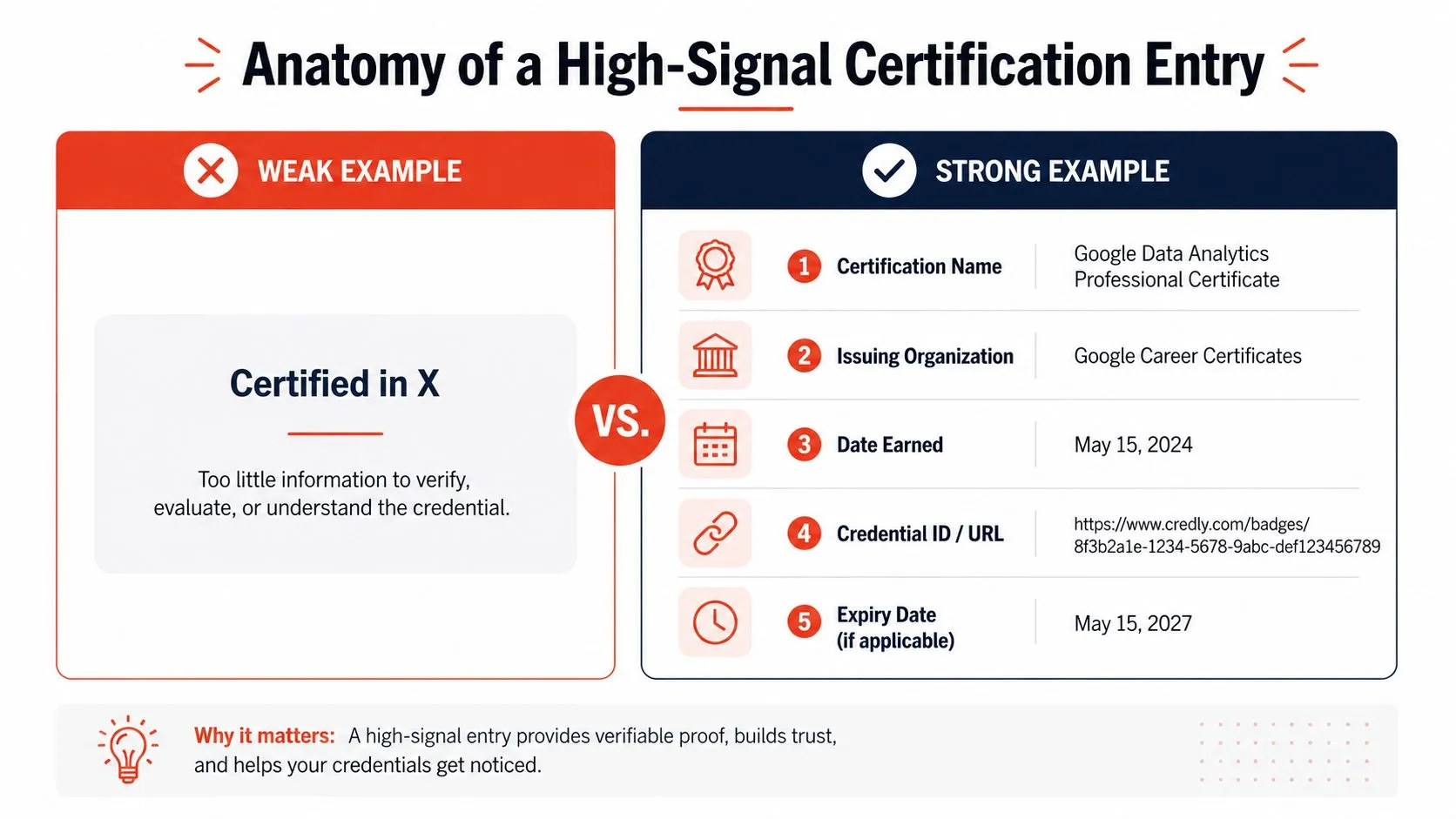
A certification line should read like a verifiable record, not a trophy plaque. Recruiters want the credential, the issuer, the date, and enough detail to check it fast. Coursera's five-part structure is the cleanest way to think about it, title, awarding institution, date awarded, expiration date if there is one, and relevant skills tied to the role. Coursera says exactly that, and the same basic logic shows up in resume guidance from other career resources.
Write the entry like a fact, not a slogan
Weak entries sound like marketing. Strong entries sound checkable.
- Weak: Certified in Cloud Architecture
-
Strong: AWS Certified Solutions Architect, Amazon Web Services, earned March 2026, credential ID available, expires March 2026
-
Weak: PMP Certification
- Strong: Project Management Professional (PMP), Project Management Institute, earned June 2026, renewal date if applicable, project scheduling, stakeholder management
Use the full certification title first, then the issuing organization, then the month and year earned. If the credential expires, add that too. If the role is regulated, add the credential ID, license number, or jurisdiction because those fields materially increase trust and help a recruiter verify the claim quickly. That is the point, not decoration.
A strong certification entry can also support the rest of the resume. If the credential gave you a skill that shows up in your bullets, reflect it there. StoryCV's guide on writing impact statements is a useful companion if you want the certification to show up as actual results, not just a line item.
Use this formula: Full credential name, issuer, date earned, expiration or renewal when relevant, and job-related skills only if they add clarity.
Keep the formatting plain. No weird symbols. No vague shorthand. If a recruiter needs to decode it, you have already lost the signal.
Where to Place Certifications Based on Your Role
Placement depends on the job, not your attachment to the credential. A nurse, a CPA, or a licensed engineer is playing a different game from a product manager with a Scrum course. One is a gate. The other is supporting evidence.
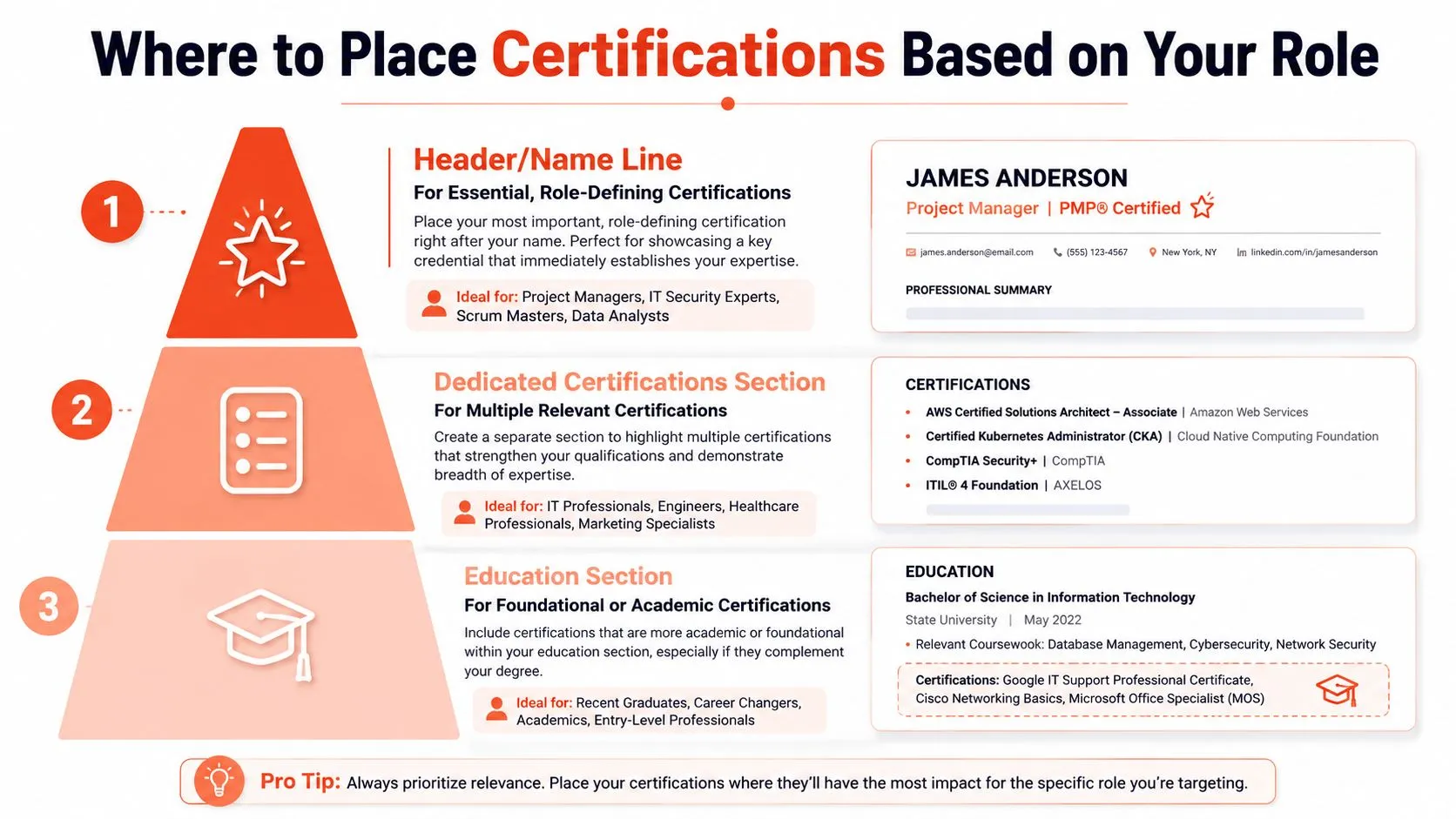
Use the header only for gatekeeping credentials
If the credential is required to do the job, put it where no one can miss it. Harvard Business School Online notes that formal, widely recognized credentials can appear next to your name as post-nominal letters, and that the most common placement for online certificates and continuing education is a dedicated Certifications or Professional Development section. Harvard Business School Online is right to draw that line.
That means a CPA, PE, or other mandatory license can sit in the name line or summary when it's central to the role. It looks appropriate because it is appropriate. But don't spray post-nominals everywhere. If the credential doesn't define the job, putting it after your name can look self-important.
Use a dedicated section for most professionals
This is the default for people with a useful cluster of certifications. A product manager with Scrum training, a business analyst with data credentials, or a marketer with platform certifications should use a dedicated section below experience and above education. That keeps the page scannable and avoids burying the credential where nobody looks.
Use education only for early-stage or foundational credentials
Recent graduates and career changers can tuck foundational coursework into education when it supports the story. That works when the credential is still new or when it belongs with the academic context that gave it meaning. For most mid-career professionals, though, education is the wrong place. It weakens the signal.
| Placement option | Best fit | What it says |
|---|---|---|
| Header or name line | Required licenses, board certifications, role-defining credentials | “I can legally do this job.” |
| Dedicated certifications section | Multiple relevant certifications | “I have verified, relevant proof of skill.” |
| Education section | Foundational, academic, or early-career credentials | “This supports my learning background.” |
Put the credential where the hiring manager expects to see it. That's the whole game.
A rigid formula won't save a weak placement choice. If a credential is mandatory, lead with it. If it's helpful, keep it in a clean section. If it's just academic background, stop trying to inflate it into something it isn't.
Role-Specific Examples for Tech Business and Career Changers
Abstract rules are nice. Concrete resumes get interviews.
Tech profiles need relevance, not a badge dump
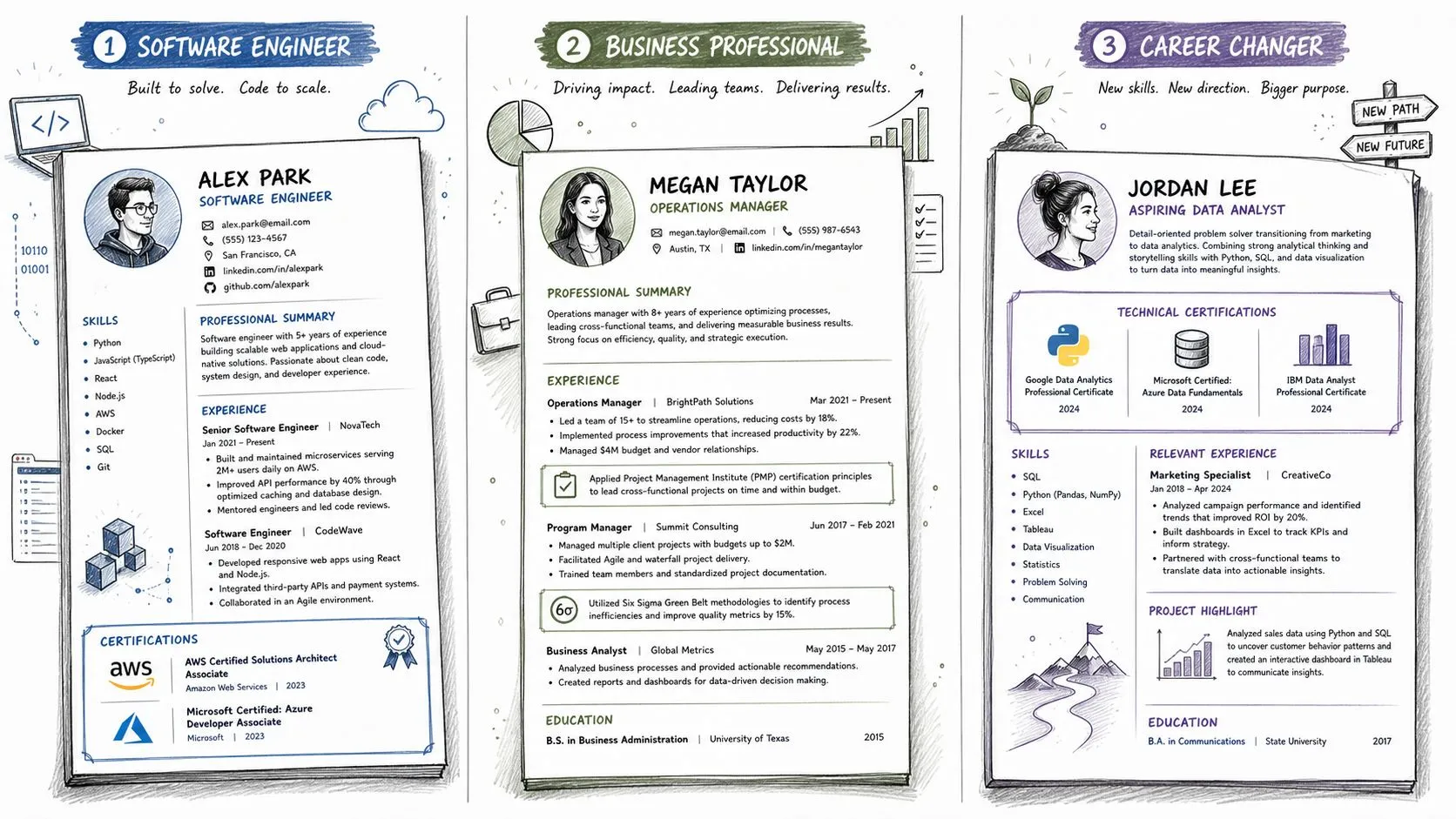
A software engineer with cloud credentials should use a short certifications section that proves current technical depth. Don't list every course you've ever touched. List the credentials that map to the work.
Software Engineer
- Certifications: AWS Certified Solutions Architect, Amazon Web Services, earned March 2026. Google Cloud Associate Cloud Engineer, Google Cloud, earned November 2025.
- Selected achievement: Reduced infrastructure provisioning time by standardizing cloud deployment steps and documenting the process for the team.
That's the right shape. The certs are visible, the issuer is clear, and the bullet shows the skill in use. If one credential is still pending, label it In progress and keep moving.
Business operations roles should connect certification to delivery
A business operations leader with PMP and Six Sigma shouldn't hide those credentials in a tiny footer. The resume should show that the training influences how work gets done.
Business Operations Leader
- Certifications: Project Management Professional (PMP), Project Management Institute, earned June 2026. Lean Six Sigma Green Belt, ASQ, earned February 2025.
- Experience bullet: Led cross-functional rollout planning, aligned stakeholders on timeline changes, and tightened process handoffs across three departments.
That works because the certification isn't floating alone. It's tied to outcomes, which is what hiring managers care about. Keep the section tight and use the experience bullets to prove the training wasn't ornamental.
Career changers need proof of commitment and translation
When the work history doesn't line up cleanly, certifications can bridge the gap. They won't erase a missing background, but they can show that you've built relevant knowledge on purpose.
Career Changer
- Certifications: Google Data Analytics Professional Certificate, Google, earned August 2025. SQL for Data Analysis, provider listed on credential, earned January 2026.
- Experience bullet: Built reporting dashboards for a volunteer project and used the same analysis workflow I learned in training.
That's the move. Don't overclaim. Don't pretend the certification equals experience. Use it to show readiness, then connect it to real work, even if that work came from a project, volunteer role, or side assignment.
Certification entries work best when they make the resume clearer, not busier.
ATS Rules and Handling Expired or In-Progress Certifications
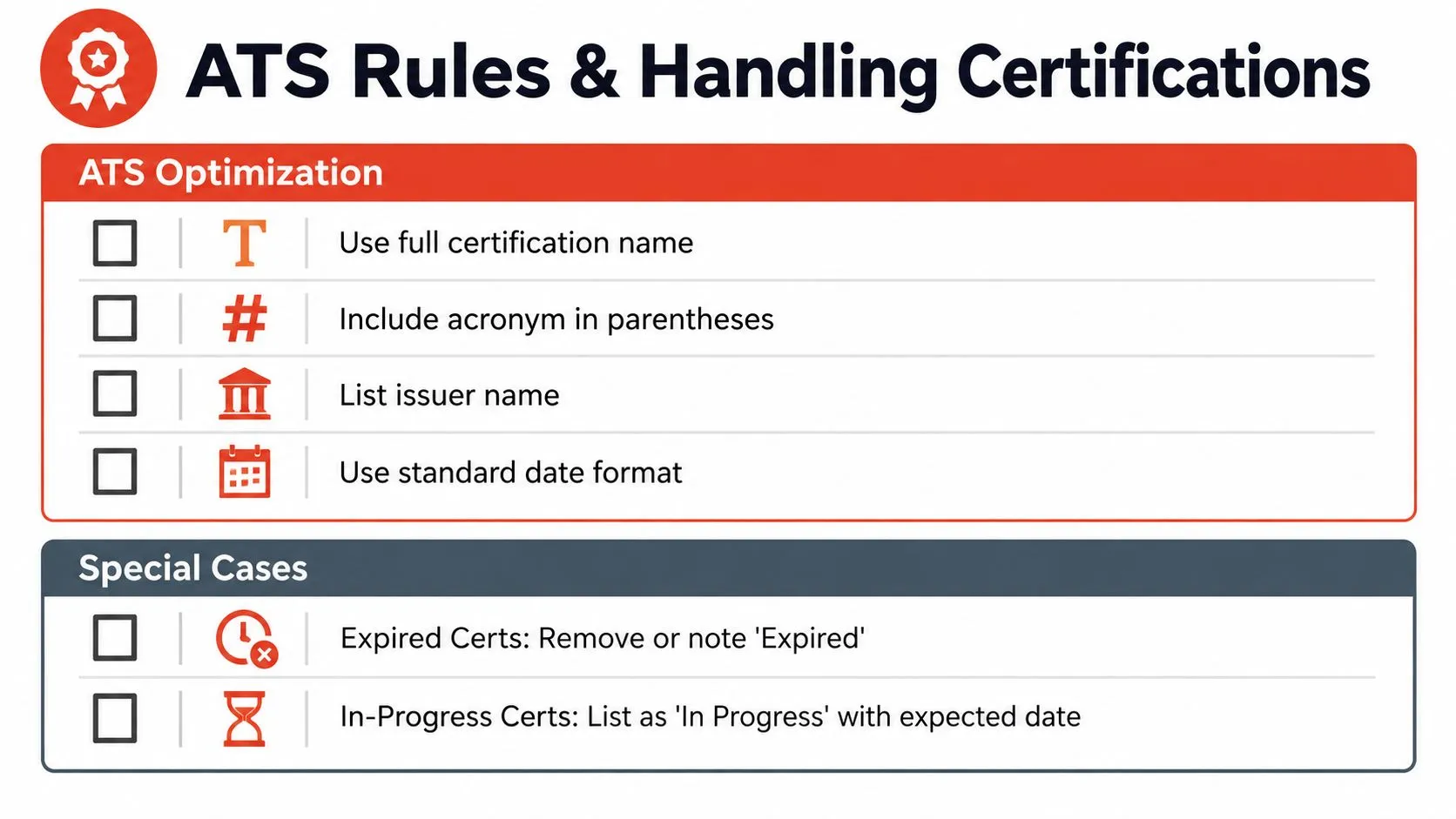
ATS systems don't admire clever formatting. They parse text. So keep the section heading standard, use the full credential name, and avoid making the system guess what you meant. A plain Certifications heading usually beats a creative label every time, and a resource like ATS resume advice for job seekers is useful if you want to stress-test the rest of the document against parsing logic.
Handle special cases honestly
Expired credentials are a judgment call. If the credential mattered and still supports the story, you can list it with a clear status. If it's stale and irrelevant, remove it. Don't leave expired credentials sitting there as if nobody will notice. Recruiters do notice.
In-progress credentials are easier. Label them In Progress and, if useful, add the expected completion date. That matches the transparency recruiters want and keeps the status unambiguous. StoryCV's overview of AI resume screening is a good reminder that hidden meaning is bad resume writing.
- Use full names: Write out the credential before the acronym if the acronym is widely recognized.
- Keep dates consistent: Month and year are enough for most entries.
- List the issuer: That's part of the verification.
- Order reverse chronologically: Newest first, always.
If the certification is current, relevant, and easy to verify, keep it. If it's expired and doesn't help the target role, cut it. That's cleaner for humans and safer for parsing.
Your Certification Placement Checklist
Run this check before you send the resume:
- Is it required or just helpful? Required credentials get priority placement.
- Does the format include the full title, issuer, and date earned? If not, fix it.
- Does it expire or renew? Label that clearly if it matters.
- Is the credential in the right section for your role? Header, certifications section, or education.
- Is it ordered newest to oldest? Reverse chronological keeps the page readable.
- Does the status say In Progress when it's not finished? Don't imply completion.
- Does it help prove fit for this job? If not, cut it.
- Do your bullets show the skill in action? Certifications without outcomes are weak.
That's the entire decision tree. Keep the credential only when it earns space and clarity. If it doesn't, it's noise.
StoryCV turns certifications into clean resume copy that recruiters can verify fast. If you want help placing credentials correctly and tying them to real impact, build your resume with StoryCV and stop burying the proof.