Stuffing your resume with keywords won't fix a missing job title or explain why your work mattered. It treats hiring software as a word-count contest, when the actual problem is getting accurate facts into searchable fields, then giving a recruiter something worth reading.
ATS explained plainly means separating parsing, searching, ranking, and human review. They're different operations. Confusing them leads good professionals to rewrite for an imaginary robot instead of showing what they changed.
What an ATS Is and How It Moves Your Resume
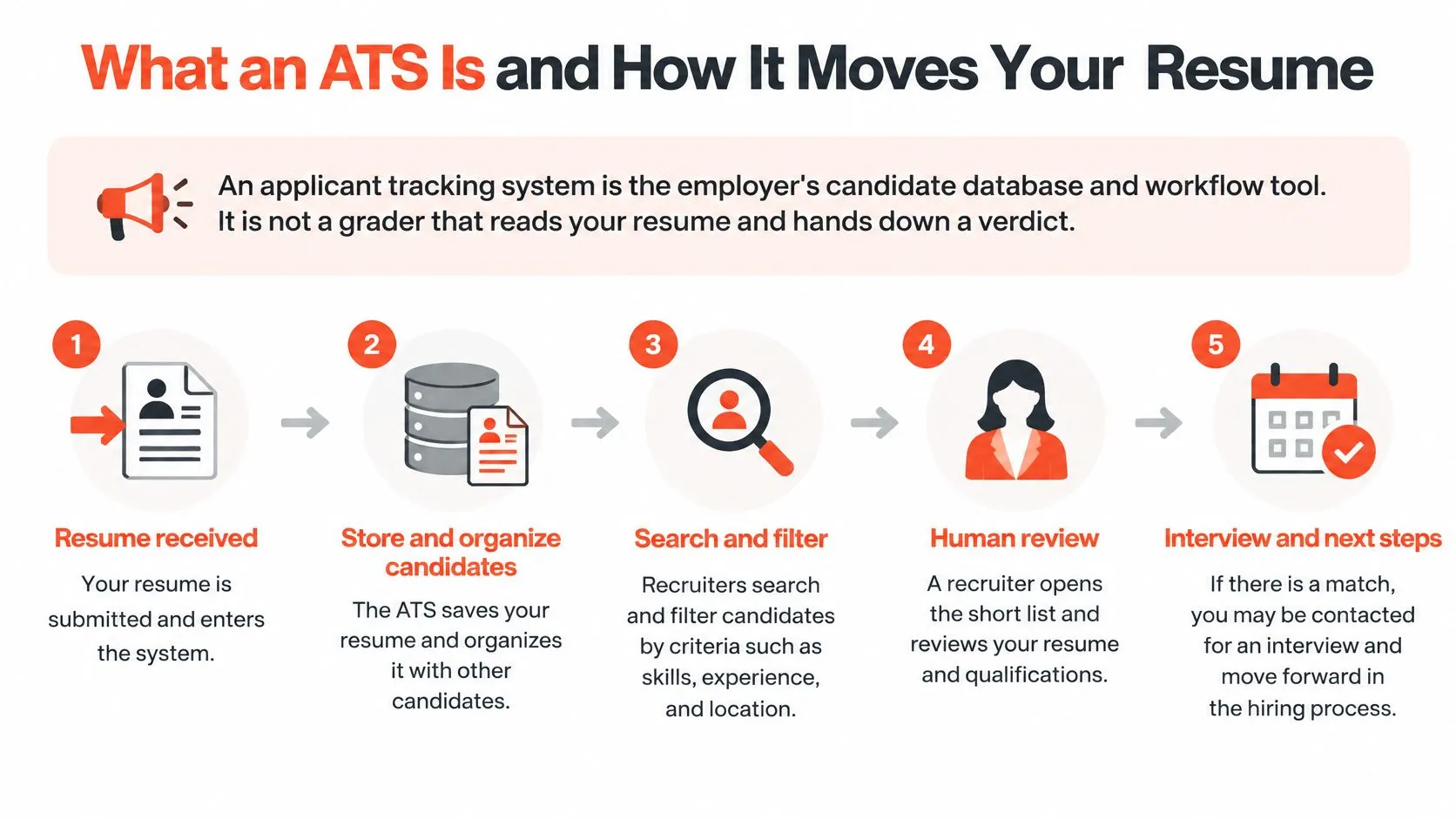
An applicant tracking system is the employer's candidate database and workflow tool. It is not a grader that reads your resume and hands down a verdict.
These systems are close to universal among large employers: a 2025 audit detected an ATS on 489 Fortune 500 companies' career pages, or 97.8%, according to Shortlister's overview of ATS adoption. That makes machine-readable experience a practical concern, not a niche resume trick.
Employers moved from paper files to searchable digital records, with Restrac's Resume Management System in 1988 allowing scanned resumes to be stored and searched by keyword, as described in ERE's history of recruitment technology.
What the ATS does to your resume at each stage
| Stage | What the system does | What it means for you |
|---|---|---|
| Upload | Saves the file to the employer's career portal | Send the requested format, commonly DOCX or text-based PDF |
| Parse | Extracts name, employers, titles, dates, education, and skills into fields | Keep titles and dates as plain text on their own lines |
| Store | Creates a searchable candidate record | Your record can surface for later roles |
| Search or filter | Recruiter filters records by title, skill, or credential | Role-specific terms matter at this stage |
| Rank or score | Some systems compare parsed data with the posting; not all do | Relevant, specific evidence helps wherever ranking exists |
| Human review | Recruiter reads the document and decides | Clear impact and scope support the decision |
The process below shows the broader workflow, including what happens after a recruiter opens the shortlist.
The stages aren't a universal conveyor belt
Employers configure their own workflows. A recruiter might search stored candidates before reviewing new applications, and a screening question might stop an application before ranking happens.
SHRM's guide to screening resumes describes candidate databases, application management, and automated screening as related functions. None makes every employer's process identical.
For a closer look at employer-side choices, nexus IT group's screening options for enterprise technology teams provides useful context on screening products. Those options shouldn't be mistaken for a universal mechanism inside every ATS.
The practical connection is simple: missing fields can make relevant experience harder to retrieve. Write so software captures the facts and a person finds evidence worth assessing.
Which Layout Choices Break Parsing and How to Check
| Element | What the parser does | Safer choice |
|---|---|---|
| Tables | Cell order can scramble and labels separate from values | Plain bulleted lines |
| Text boxes | Content can be skipped or pulled out of order | Ordinary paragraphs |
| Headers and footers | Contact details and dates may be dropped | Key facts in the body |
| Images and graphics | Text inside may be ignored or erased | Plain text for essential information |
| Multi-column layouts | Columns can merge employers with dates | One column |
| Standard headings | Sections map to Experience, Education, and Skills | Use those exact labels |
Parsing is information extraction. Software has to identify which text is a job title, which is an employer, and which dates belong to that job. A polished design doesn't guarantee those associations survive.
Forbes Advisor's ATS resume guidance, citing MIT Career Advising, warns that images, text boxes, tables, and decorative graphics can be distorted, ignored, or erased. The safer approach is one column, conventional headings, and ordinary text, with the employer's requested file format taking priority.
Practical rule: Keep every fact you'd want a recruiter to search for in the document's main text.
Check the reading order before uploading
A plain-text check won't reproduce an employer's parser. It will expose obvious extraction problems before you submit.
- Copy everything into a plain-text file. Read from top to bottom. If skills interrupt an employment entry or dates drift away from employers, simplify the layout.
- Separate each job's identifying details. Give the title, employer, and employment dates distinct lines. Don't rely on spacing alone to communicate their relationship.
- Check section headings. Use recognizable labels and proper heading styles where your editor supports them. A decorative label such as Career Adventures makes classification unnecessarily difficult.
- Look for missing content. Confirm that your name, contact details, certifications, employers, and dates survived. Move anything missing out of headers, footers, or boxes.
- Test your accessible version too. If you use a screen reader, enlarged text, or another accessible format, check its reading order rather than assuming the exported file behaves identically.
After uploading, review any fields the application portal fills automatically. Correct a misplaced title or date before submitting when the portal allows it.
Don't confuse a test with a guarantee
A 2026 academic preprint evaluating a hybrid parser reported 91.3% precision, 87.5% recall, and 80.8% overall accuracy, processing each document in under two seconds, according to the parser evaluation. Those results describe that experimental system, not every employer's software.
Precision concerns whether extracted information is correct; recall concerns how much relevant information the system captures. Neither is a candidate's qualification score.
Use checks to catch missing or misfiled facts. Don't chase a supposed universal passing number.
Where Keyword Matching Ends and Human Review Begins
A keyword match isn't evidence of competence. Writing DevOps tells a recruiter what category you want to appear in, not what you can do.
Simple searches can also miss overlapping language. Customer acquisition and growth marketing may describe related work, but a search for one phrase won't necessarily retrieve the other. Research on resume matching explores semantic approaches using language models and embeddings, while identifying extraction and keyword-selection limitations.
The distinction is terminology versus meaning.
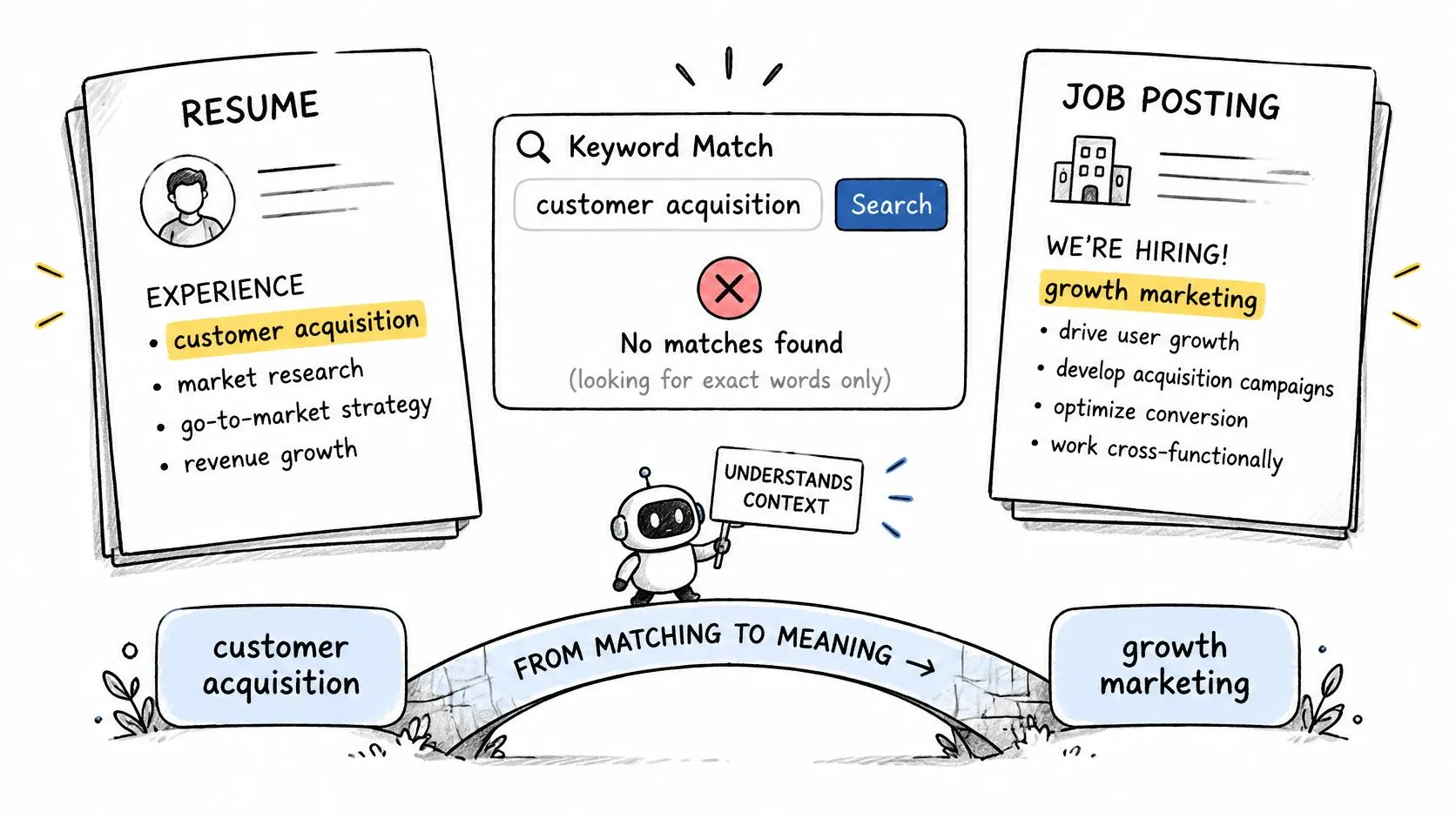
Matching is only part of screening
The workflow table separates extraction from recruiter-controlled searches and optional ranking. Screening questions add another mechanism: an answer about a required credential can trigger an employer's rule regardless of the wording in your resume.
In 2025, 32.1% of employers using AI reported using it to screen applicants and resumes, up from 11.6% in 2024, according to iHire's State of Online Recruiting report. The accompanying survey findings describe AI use primarily for high-volume screening and matching, with only 7% preferring AI for final offers.
That doesn't mean every application receives human attention. It means automated screening and final hiring judgment aren't interchangeable. The distinction matters when interpreting AI resume screening.
Discoverability isn't persuasion. A relevant term can help someone find you. Context helps them judge you.
Consider a hypothetical engineering bullet:
- Label only: DevOps.
- Evidence: Automated CI/CD checks to reduce deployment time and remove manual release steps.
If you have a verified deployment-time reduction, add it. If you don't, describe the observable change without manufacturing a percentage.
A reviewer can ask what you automated, how the checks worked, and what changed for the release team. That's useful evidence. Repeating DevOps cannot supply it.
The better question isn't whether software will read your resume. Ask which facts become searchable, which rules the employer controls, and what evidence a person needs to assess your contribution.
Common ATS Myths and What the Evidence Shows
These beliefs turn separate hiring operations into a single mysterious rejection machine. The distinctions are less dramatic, but far more useful.
ATS myths compared with what the evidence supports
| Common belief | What the evidence supports |
|---|---|
| Fonts or columns get you auto-rejected | Layout can break extraction, which is different from automatic rejection on style |
| A high score proves you are qualified | A matching score reflects selected signals, potentially including keywords, not proof of fit or interest |
| Keyword stuffing gets you through | Repeated terms without proof read as filler and blur what you did |
| Every employer uses the same system and score | Parsers, fields, and ranking logic differ across systems |
| Software makes the final decision | AI is used mostly for high-volume screening and matching; people generally decide final offers |
Extraction errors are also an accessibility issue
A peer-reviewed study of resumes from job seekers with visual impairments examined 99 resumes and found an average ATS extraction rate of 84.22%, ranging from 40% to 100%. Researchers reported incorrectly extracted elements, likely related to formatting.
That finding doesn't establish an error rate for every applicant. It demonstrates why ATS-friendly shouldn't be treated as a yes-or-no label attached to a template.
A resume can be readable to its author and still lose the relationship between a qualification and the person who earned it. For someone using accessibility software, removing useful document structure in pursuit of visual minimalism can create another problem rather than solve the first.
Preserve accessibility and meaning. Don't sacrifice either to satisfy an unexplained score.
Make verification practical
Use semantic headings, readable typography, and a predictable document order. There's no need to shrink text until the page becomes uncomfortable to read.
Career changes and gaps need similar care. Keep actual employment dates explicit, distinguish paid roles from projects, and explain transferable work through concrete actions rather than relabeling yourself with an unsupported title.
Where a portal displays extracted information, inspect it. Where it doesn't, retain a straightforward text-based version and check that its content reads coherently outside your editor.
Make the document readable first, then make the evidence specific. Neither formatting advice nor a matching score can promise fair evaluation or an interview.
Matching Job Terms Without Keyword Stuffing
Take terminology from the actual posting, not a generic keyword list. The employer is telling you which capabilities matter for that role.
For example, if you're comparing analyst positions, you can browse business analyst openings on JobGlance and examine how employers describe requirements gathering, process mapping, and stakeholder work. Use those postings to understand language, not to collect terms indiscriminately.
Put the term where the work happened
Suppose you built a customer acquisition program and the target posting calls for growth marketing. If both descriptions accurately fit your work, connect them inside a bullet.
| Weak | Stronger |
|---|---|
| Skilled in growth marketing, customer acquisition, and paid channels. | Built the customer acquisition program behind the growth marketing plan, adding paid search and partner referrals, with a monthly review of cost per signup. |
Both versions contain relevant terms. Only the stronger version identifies a program, channels, and a review process a recruiter can ask about.
It still needs your real outcome if you have one. Did the program establish a new acquisition channel, improve signup quality, or change spending decisions? Don't assume that adding terminology finishes the writing.
A keyword belongs in your resume when you can explain the work behind it in an interview.
Run a truth-first terminology pass
- Identify the requirements. Note named skills, methods, systems, and credentials. Separate essential qualifications from general company language.
- Locate supporting experience. Find the project or responsibility where each relevant term belongs. A skills section can summarize proficiency, but it shouldn't carry the entire claim.
- Adjust accurate wording. Use the employer's phrase when it accurately describes your work. Expand an unfamiliar acronym when that improves clarity.
- Delete unsupported additions. Repeat a term only when another fact justifies it. Don't paste the posting into your resume or hide words in invisible text.
The useful test for avoiding keyword stuffing is whether each addition makes your experience clearer. If removing a repeated phrase changes nothing, you probably don't need it.
Rewrite One Role With Context Before You Apply
A responsibility names the job. Context helps a recruiter understand its scale and significance.
This hypothetical comparison illustrates the difference. The figures are examples, not numbers to borrow.
| Weak | Stronger |
|---|---|
| Managed network infrastructure. | Managed a 600-device Cisco network across 14 sites, maintaining 99.99% uptime. |
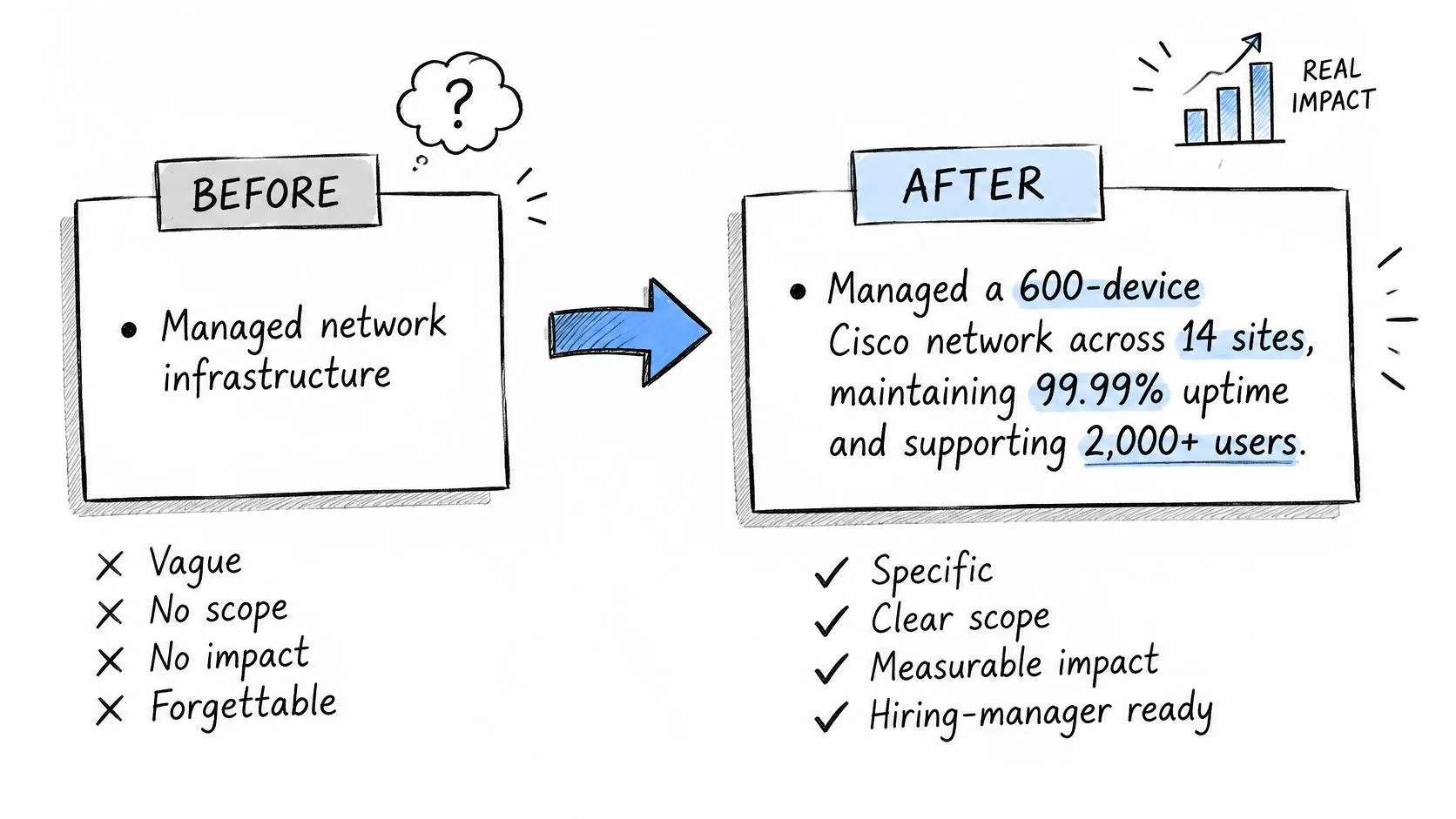
The stronger line gives the reader responsibility, context, action, and outcome. It shows scale and reliability, though another bullet may be needed to explain a specific improvement you made.
Use these prompts to find the details behind one role:
- System: What did I own or support?
- Scale: How large or complex was it?
- Action: What did I change or keep running?
- Outcome: What happened because of that work?
StoryCV guides you through questions about your work and turns your answers into resume-ready writing. You don't need to explain terms such as backend engineer, RevOps, or OKRs. If one of the seven things StoryCV asks about is missing from your answer, it follows up.
Use these ATS resume bullet-point principles to rewrite one role's strongest contributions, then check the exported text.
For another perspective on the writing process, watch the video.
StoryCV is an AI-powered resume writer that helps turn your experience into clear, evidence-rich writing. Visit StoryCV, talk through one role, and shape a narrative that gives software recognizable facts and recruiters a reason to keep reading.