Adding more software names won't fix a weak computer technician resume. “Troubleshot hardware and software issues” tells a hiring manager you held the job, not whether your repairs lasted.
Keep the tools. Change what you lead with: the fault you isolated, the decision you made, and the evidence that the customer didn't need the same repair again.
Why Tool Lists Fail Every Computer Technician Resume
“Troubleshot hardware and software issues” is true of every computer technician who's held the job. It's a responsibility, not evidence of skill.
Windows, Linux, network equipment, and ticketing platforms describe your working environment. They don't distinguish someone who resets a device from someone who finds why it keeps failing.

Consider technicians with identical skills sections. One restores service temporarily and leaves an unresolved cause. The other isolates the fault, verifies operation, and documents the repair so another technician doesn't have to start over.
Their resumes look interchangeable unless the experience bullets explain the difference.
The hiring test: What did you resolve that a routine reset or standard replacement hadn't resolved?
Keep skills in their proper place
Use a skills section for orientation, not your entire argument. The distinction between basic computer skills on a resume and diagnostic evidence matters especially when you're applying for technical support work.
For a hiring-side perspective, GENTY recruitment's resource on skills-first recruiting for tech teams is relevant context. On your own document, make the skill observable through a decision and its result.
Whether you call it a computer technician CV or a resume, the editorial test stays the same. Show what happened after you touched the equipment.
Computer Technician Resume Examples, Before and After
| Tool-list version | Resolution-quality version | What changed |
|---|---|---|
| Troubleshot hardware and software issues for employees | Resolved a recurring Outlook sync fault that two earlier tickets had closed as user error; traced it to a corrupted profile cache and confirmed it did not return | Names the difficulty, the cause, and the proof that it held |
| Repaired laptops and desktops | Took back a laptop another shop had reflashed twice; traced an intermittent shutdown to drive errors in health logs, replaced the drive, and tracked the unit with no return inside the warranty window | Shows the prior failed attempts and the diagnostic step that found the fault |
| Installed and repaired broadband equipment at customer homes | Cleared a repeat no-signal call involving a damaged drop; replaced the drop and a faulty splitter missed on earlier visits, closing the ticket on the technician's first visit | Turns a routine visit into a case with a missed cause and a first-visit close |
| Supported network connectivity | Fixed a VPN dropout that had survived two prior visits by isolating a DNS timeout tied to a router firmware version; documented the fix so the desk could resolve matching incidents without escalation | Gives the difficulty, the isolating step, and a reusable resolution |
These are illustrative rewrites, not reported results or customer case studies. Use the structure, not the claims. Counts, previous visits, warranty outcomes, and diagnostic findings belong on your resume only when they're yours.
Read the diagnostic decision
The Outlook example changes the story from general support to correcting a mistaken diagnosis. The important detail isn't the application name. It's that the technician investigated a recurring fault instead of accepting the previous explanation.
The repair-bench example separates repeating an intervention from testing a different cause. Reflashing hadn't solved the shutdown. Checking health logs supplied a reason to replace the drive rather than try another software repair.
The broadband example makes the repair location explicit. Replacing equipment at the customer's end isn't the same as finding a damaged drop and a faulty splitter. “First visit” refers to that technician's visit, not the customer's entire service history.
The VPN example adds something beyond restoring connectivity: a documented resolution other support staff could use. Don't claim fewer escalations unless you observed that result. A usable support procedure is still worth describing without inventing an improvement rate.
State the limits of your evidence
“No return inside the warranty window” is more defensible than “fixed permanently.” The former names an observation period. The latter claims knowledge you probably don't have.
Likewise, a closed ticket alone doesn't establish a durable repair. Verification might mean testing the original failure condition, checking with the user afterward, or reviewing whether the incident reopened.
A strong computer technician resume example gives the interviewer a case to question, not an adjective to accept.
Replace these scenarios with your own work. If you couldn't explain the diagnosis, the repair decision, and the verification in an interview, rewrite the bullet.
How to Write Bullets That Prove a Fix Held
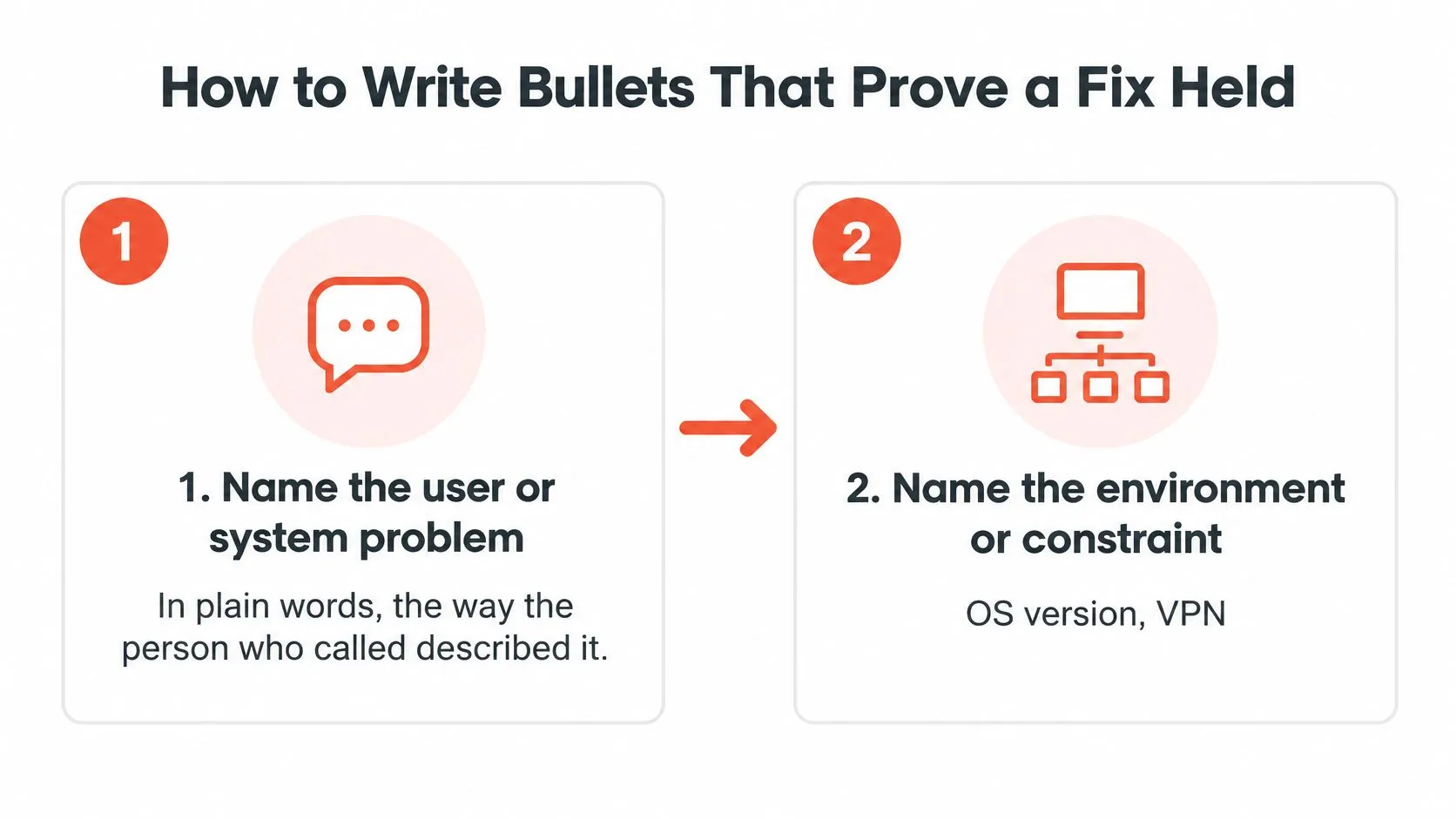
- Name the user or system problem. Use plain language. “Connection dropped during remote work” gives the reader a symptom to understand.
- Add the environment or constraint. Include the operating system, VPN client, remote site, service-level target, or warranty condition that affected your decision. Skip details that didn't matter.
- Describe the isolating action. Explain what you tested, ruled out, or compared. “Checked drive health logs” shows more judgment than “used diagnostic software.”
- Give the operational result. Use a defensible count, service outcome, or verification detail. Don't manufacture a percentage because the sentence looks unfinished.
Use this visual as a reminder to establish the problem and its context before describing the repair.
Don't skip the diagnostic action
The diagnostic step carries the evidence of judgment. Without it, “restored access” could mean anything from restarting a client to isolating a recurring authentication fault.
That emphasis fits the occupation. O*NET's computer user support specialist profile includes diagnosing problems and verifying system operation, rates computer-and-electronics knowledge at 98/100, and identifies troubleshooting, critical thinking, active listening, and reading comprehension as relevant competencies.
An illustrative assembled bullet from that workflow is: “Resolved Windows endpoint and VPN incidents across 180 users by isolating DNS and authentication faults, documenting fixes in the ticketing system, and restoring access within SLA,” using the occupation's diagnostic and verification framework.
Treat the user count as example wording, not a number to copy. Also notice its limit: it establishes scope and restored access, but doesn't establish whether incidents recurred. Add that claim only if your records support it.
Match the outcome to the evidence
Ticket volume shows workload. First-contact resolution shows handling effectiveness. Repeat-incident records address durability more directly.
Choose the measure you have available. If you can't establish a baseline, report users supported, devices provisioned, the environment, or verified service-level performance.
For an additional resume-writing walkthrough, use the video below.
Read the finished bullet once more. If it could describe an easy fix and a stubborn fault equally well, add the detail that made the diagnosis difficult.
Proving Results Without Formal Metrics
Most shops never run first-call resolution reports. Yours may not track them at all. No dashboard means no number to quote, and that is a records problem, not a skills problem.
Start with evidence you can still pull: ticket histories, deployment logs, repair notes, escalation handoffs, knowledge-base articles you wrote. Check your memory against records you're authorized to see, and keep customer names and employer details out of the resume itself.

Pick the case where the fix was doubted
The strongest no-metric story is a problem everyone expected to come back, and it didn't:
- A fault other techs had already touched. Say what they checked, what they missed, and what you tested instead.
- A repeat caller. The user kept opening tickets until you found the root cause. Name it, and say how you confirmed it stayed fixed.
- A deadline with a customer waiting. Show your triage order, what you restored first, and what you told them to expect.
One honest case beats a line of invented percentages. Guidance on quantifiable achievements can help you separate real scope from a claim you can't defend in an interview.
Write down what you actually said to the user
Communication is part of the job's measurable demands, not filler. The U.S. Bureau of Labor Statistics occupational requirements factsheet tracks it as a working condition for computer user support specialists.
So show the communication itself. Maybe you explained a recurring connection fault without blaming the user, gave prevention instructions they could follow alone, or wrote symptoms clearly enough for a second technician to reproduce the issue.
Skip the phrase "excellent customer service." Name the explanation, handoff, or instruction, then name what happened because of it. If the next tech closed the ticket from your notes and the caller stopped coming back, that is the result worth writing down.
Keywords and Skills That Pass the Filter
A screening tool can't tell whether your fix held. It matches words. Give it the posting's words, then back each one with work that stayed closed.
Match the posting's language when it accurately describes your experience. If it names an operating system, ticketing platform, certification, or support method you've used, write that exact term. Then attach it to a resolved ticket. "Active Directory" alone tells the reviewer nothing. "Resolved recurring account lockouts in Active Directory, traced to a stale mobile credential" says the fix held and the calls stopped.
Make the document easy to extract
Use a single column and conventional headings: Summary, Technical Skills, Experience, Projects, Certifications, Education. Keep job titles, employers, locations, and dates in a consistent order.
Drop text boxes that hide chronology. Cut vague phrases like "knowledge of networks." Cut technology names with no work behind them. Treat practical ATS resume optimization as formatting risk control. It won't get you hired on its own.
Pair each skill group with proof
Never list a platform you haven't used. One interview question turns a borrowed keyword into a credibility problem.
| Skill group | Where it belongs | Proof to pair with it |
|---|---|---|
| Endpoint administration | Experience bullets | Device or user counts, imaging or deployment scope |
| Operating systems | Technical Skills and bullets | Named OS versions in a resolved-ticket bullet |
| Networking | Experience bullets | A connectivity case with the cause found |
| Identity and access | Experience bullets | Account lockouts or access rollouts handled and closed |
| Ticketing systems | Technical Skills and bullets | Named platform beside ticket volume or service-level performance |
| Scripting | Projects or bullets | A repeated task automated and the manual work removed |
| Security | Experience bullets | A malware or patch case closed and verified on the endpoint |
If you're earlier in the path and still choosing what to study, Edvdo's assessments for subject and stream choices are built for that stage. Once you're past it, a technician resume runs on hands-on evidence, not aptitude results.
Length and Tailoring by Role
Don't force an experienced technician's resume onto a page by deleting the evidence.
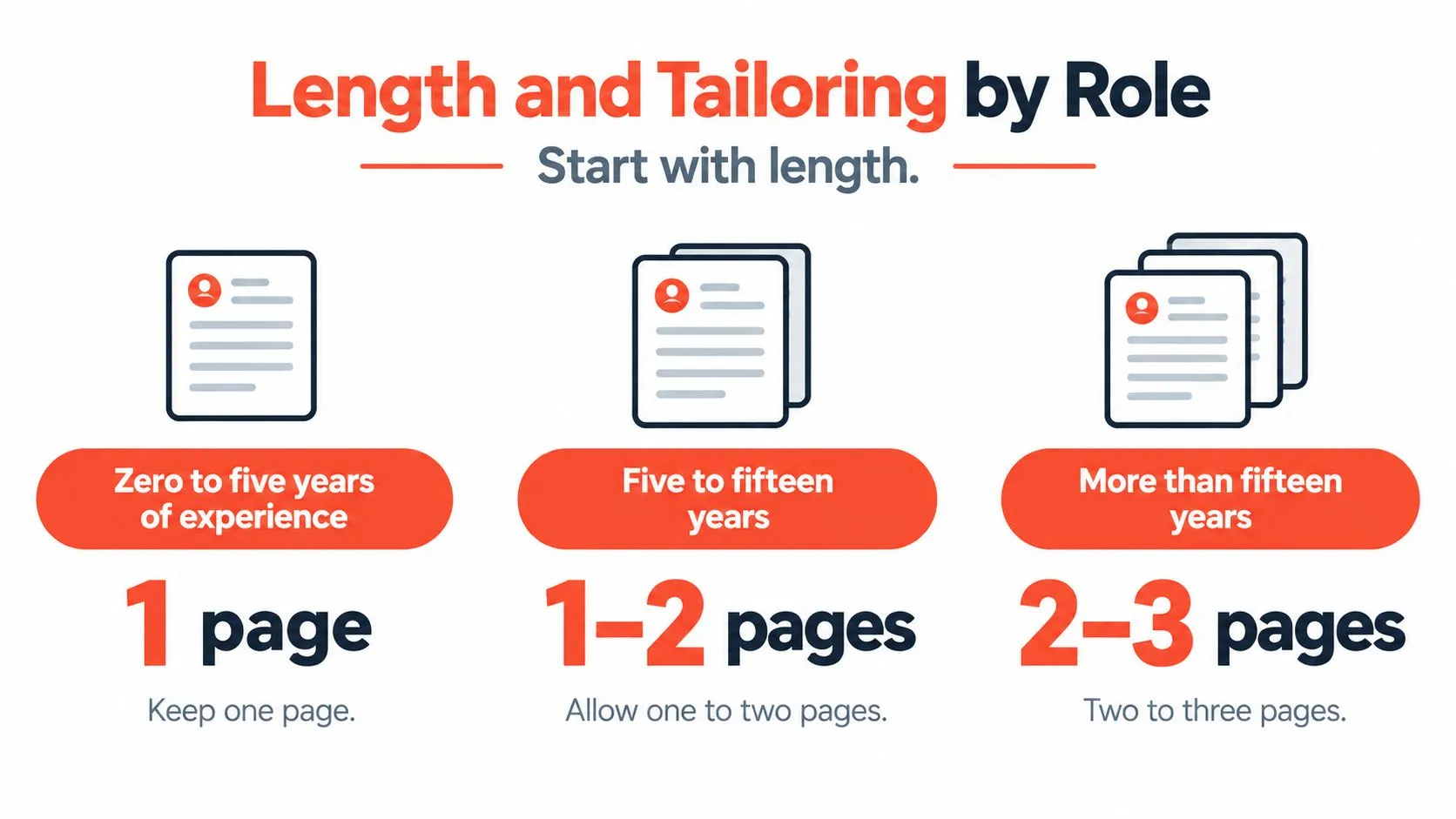
A staffing survey summarized by iReformat reported that 77% of hiring managers preferred two pages for candidates with more than five years of experience, while 91% accepted one page for entry-level candidates; its suggested ranges were one page for zero to five years, one to two pages for five to fifteen years, and two to three pages for more than fifteen years.
Use these ranges as an editing starting point, not permission to retain everything.
Spend space on relevant evidence
An additional page should establish systems supported, major deployments, escalation ownership, relevant certifications, service improvements, or progression. Duplicated skills and unrelated duties don't justify it.
A computer repair technician resume should foreground diagnosis and repair verification. A broadband technician resume needs service-call evidence, while a Comcast technician resume should mirror the actual posting's installation and customer-service terminology where truthful. Don't imply employment with a company merely to match a search phrase.
| Role | Lead with | Proof to emphasize |
|---|---|---|
| Help desk or end-user support | Users supported and response handling | Repeat-ticket reduction and escalation quality |
| Computer repair technician | Diagnosis of hardware faults and parts | Devices returned without repeat failure and data recovered |
| Broadband or cable field technician | Installs, repairs, and first-visit closure | Repeat visits avoided and equipment replaced at the right point |
| Comcast-style install or field role | Customer-facing installs and service calls | Installs closed on the first visit and recurring faults traced to the source |
| Onsite or field IT service | Sites covered and fixes verified onsite | Rollouts supported and issues closed before departure |
The role label changes the emphasis. It doesn't change the need for defensible evidence.
Pick One Hard Case and Write It Down
Choose a recent repair you'd be comfortable discussing with a hiring manager. Gather the relevant notes before relying on memory, then draft the problem, environment, diagnostic action, and verified outcome.
Check the result against these questions:
- Can a stranger see the difficulty? Include the constraint or failed approach that made the case worth mentioning.
- Can you defend every claim? Remove any cause, count, or outcome you can't explain confidently.
For the VPN example, the useful questions are specific. What did the user see? What did you rule out? What changed, and did the dropout return?
Those answers supply context that “supported network connectivity” leaves out. Repeat the exercise for each recent role, keeping the strongest relevant cases rather than turning every ticket into a bullet.
Write the case you can explain, not the achievement you wish you'd measured.
StoryCV is an Online Resume Writer that asks about your real work and turns your answers into resume-ready writing. Bring the VPN fault, repeat repair, or difficult service call you can explain, then check the draft against your records. Start my role and turn that diagnosis into a bullet you can defend.