Most ATS advice gets the order wrong. People obsess over beating the filter, then wonder why a recruiter still passes on the resume. The core problem is simpler, and harder: your experience is valid, but your wording doesn't match the employer's vocabulary.
That mismatch matters because ATS is everywhere at scale. One 2025 analysis reported that 97.8% of Fortune 500 companies used an ATS, and recruiters relied heavily on filters, with 99.7% using ATS keyword filters and 76.4% filtering by skills (ATS resume study 2026). If your resume doesn't speak the same language as the job post, it can get sorted out before a human ever sees it. The fix isn't tricking software. It's translating your work clearly.
Why Passing the ATS Is the Easy Part
Passing the ATS is table stakes. The hard part is sounding like someone who should be hired after the file opens.
A lot of candidates treat the ATS score like the finish line. It's not. A resume can clear parsing and still fail because the hiring manager can't quickly connect your experience to the role. That's why the important work starts after the machine is satisfied.
Practical rule: optimize for the first read, not just the first scan.
The scale problem is real. With 97.8% of Fortune 500 companies using ATS and recruiters leaning on keyword and skills filters, resume language has to do two jobs at once, machine-readable and human-credible (ATS resume study 2026). That's also why generic “pretty” resumes fall apart. Design doesn't rescue weak wording.
If you want a clean explanation of how software screening fits into the hiring funnel, this AI resume screening guide is worth reading. The point isn't to outsmart the system. It's to make your real value legible.
The translation problem
Qualified candidates get filtered because they use different terminology than the job post. A project manager may say “cross-functional delivery” while the posting says “stakeholder coordination.” A sales leader may write “pipeline growth” while the job asks for “revenue forecasting.” Same competence, wrong language.
That's the lens to use for how to optimize resume for ATS. Stop asking, “How do I cram in more keywords?” Ask, “How do I name my work the way this employer names the job?” That shift changes everything.
ATS-Friendly Resume Structure That Parses Cleanly
A resume built for parsing follows a plain, linear structure. No fancy layout, no hidden text, no guessing.
Fancy formatting is where good candidates get tripped up. Keep the file boring in the right way, because ATS software reads order and clarity before it reads talent.
Plain DOCX showed a 4% ATS parsing failure rate versus 18% for PDF in one 2026 analysis of 1,000 resumes across Workday, Taleo, and Greenhouse, and single-column layouts parsed at 93% accuracy versus 86% for two-column layouts (ATS filtering and keyword screening statistics). That is a deliverability problem, not a design preference.
Use a clean order the parser won't fight
Reverse-chronological work history is the safe choice. Put your most recent role first, then move backward. Use standard headings like Summary, Work Experience, Education, and Skills. Creative section labels create friction.
Keep bullets tight. One idea per bullet, one result per bullet when it fits. Long paragraphs may look polished to a person, but they are bad input for a parser.
The header and footer trap is real too. About 35% of ATS parsers skip the header/footer entirely, and roughly 28% partially extract it, so contact details belong in the main body (header and footer parsing). Put your name, phone, and email where the system will see them.
Put contact details where a human expects them, not where a template designer wanted to save space.
Use text, not a picture of text
ATS can only read selectable text. Text-based PDFs and DOCX files work. Scanned PDFs do not, because there is no text layer to extract (ATS resume formatting guide). If you exported your resume from a design tool and the text is embedded as an image, you created a parsing problem.
For a useful industry example of structured resumes supporting machine screening, read TekRecruiter's 2026 guide to hiring AI engineers. The role requirements are specific, which is exactly why standard headings and readable formatting matter.
If you want a simple way to organize sections, use the same categories outlined in this resume categories guide. Keep the structure plain. Get parsed.
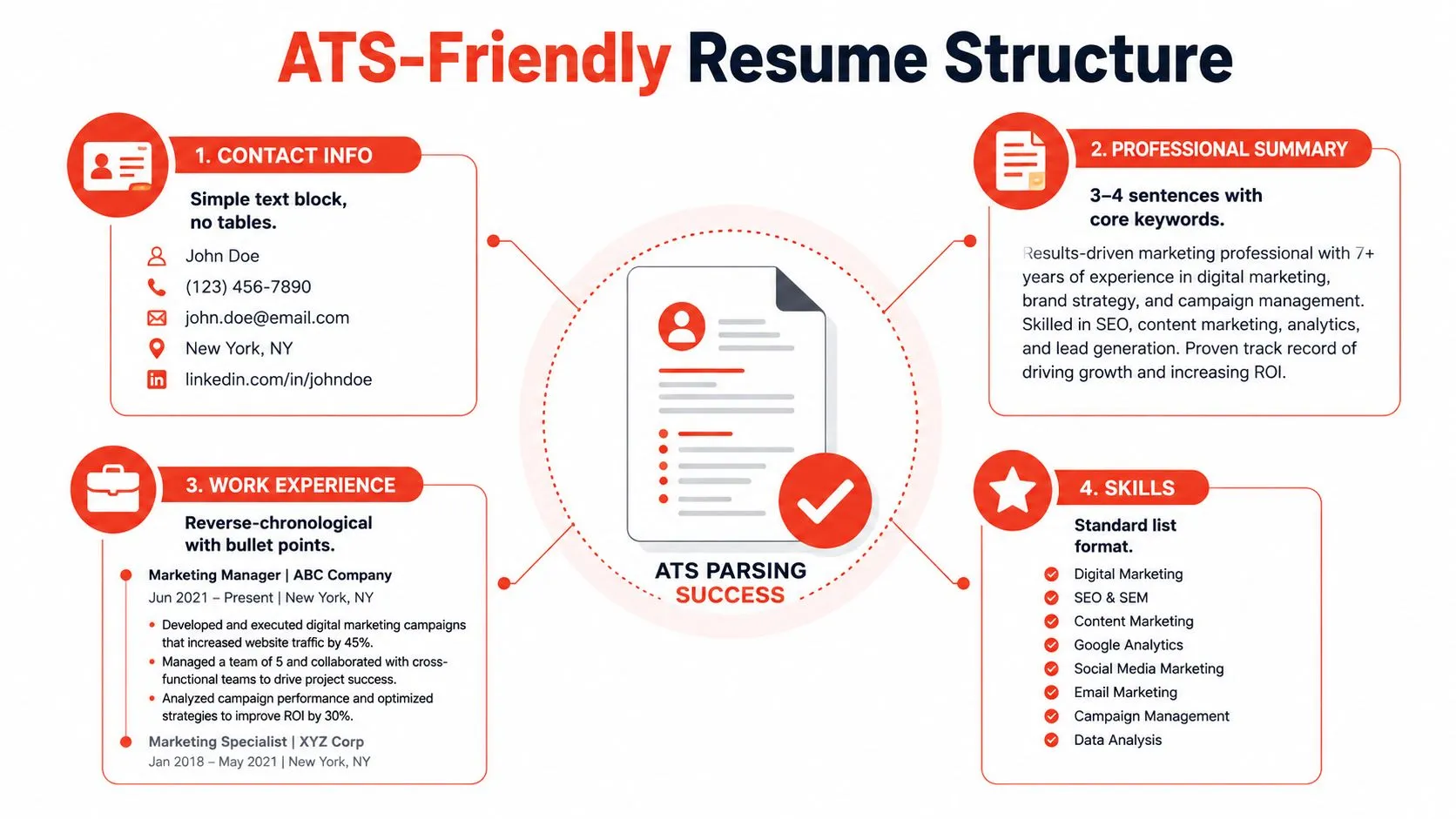
Your working blueprint should look like this, in this order:
- Contact Info in the body, with simple text only.
- Professional Summary with the target title and core skills.
- Work Experience in reverse-chronological order, with plain bullets.
- Skills as a standard list, no graphics, no tables, no icons.
That structure will not win style points. It will get read.
Keyword Strategy Without Keyword Stuffing
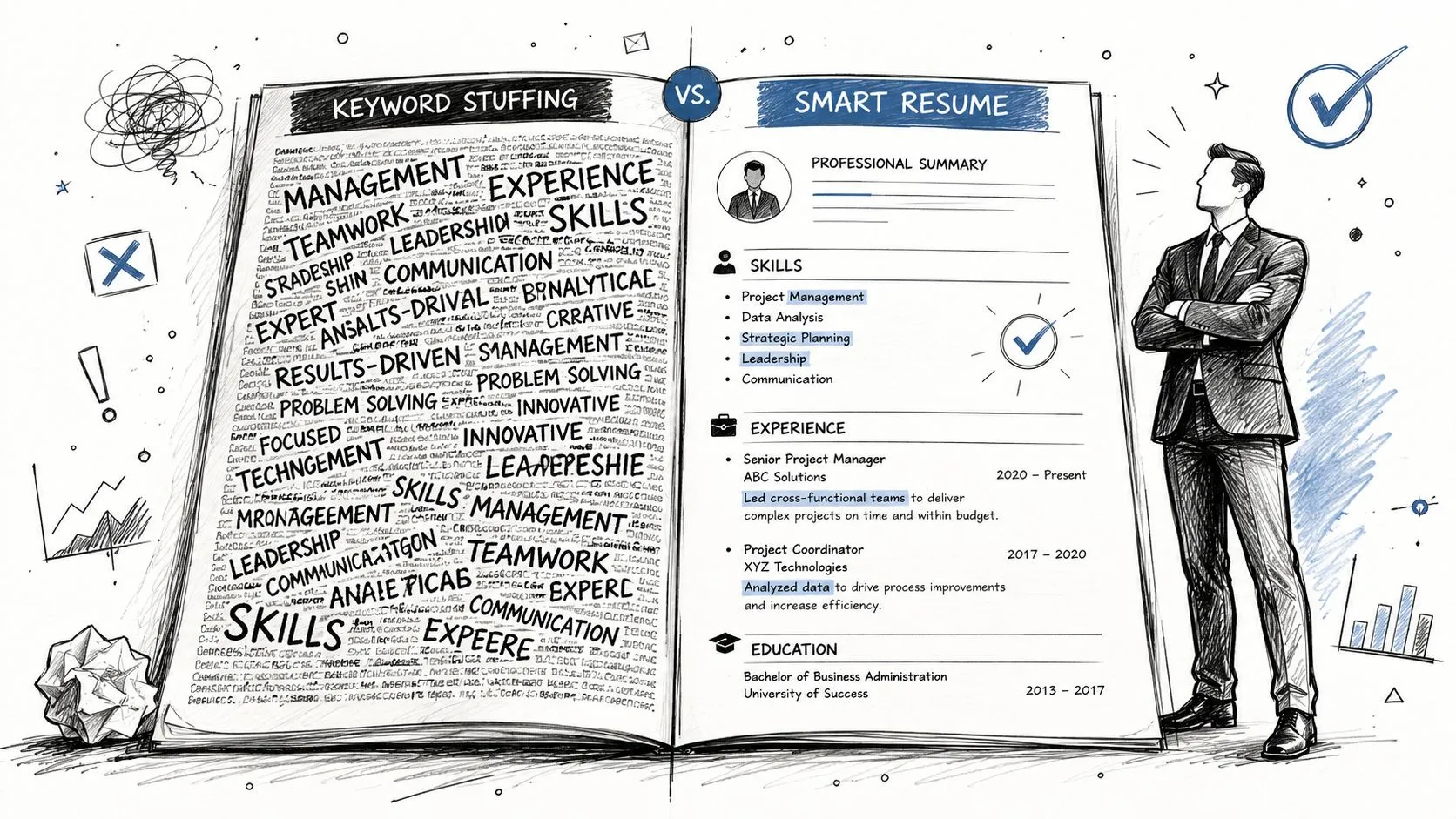
Precise translation beats repetition every time. Keyword stuffing reads like a broken autocomplete prompt, while targeted wording reads like a candidate who understands the role.
Start with the job description and pull out the terms that matter. Put exact matches in Skills, use the target title once in your Summary, and place a few of the strongest terms in Experience only where they are true. If the posting asks for “forecasting,” “pipeline management,” and “HubSpot,” those words should appear where they fit naturally, not scattered across the page like filler.
Evidence beats vocabulary. If the posting says “project management,” do not repeat the phrase five times. Show the project size, the coordination, the deadlines, and the outcome. That is translation, and it carries more weight than noisy repetition.
A useful keyword stuffing guide spells out the trap clearly. More words do not equal more relevance.
A bad bullet looks like this, “Managed managed managed project management across cross-functional stakeholders using strategic project management tools.” It is bloated and useless.
A better version is, “Led cross-functional product launches, coordinated stakeholders across design and engineering, and kept delivery on schedule.” Same kind of work. Better signal. Less noise.
If a keyword cannot be backed by a real task, result, or tool, leave it out.
The mistake is treating terminology as decoration. It is how the system classifies you. If your title changed over time, or your past industry uses different language, match the employer's wording without lying about your history.
One ATS statistics report found that optimized resumes improved the median ATS score by 13 points after a single cycle (ATS statistics). That is not magic. It means focused edits move the file out of the weak pile.
A brief guide from RewriteBar shows the same rule in another format. Name the work the way the employer names it.
Tailoring Your Resume for Each Job Description
Tailoring is not rewriting your whole career for every application. It's a focused pass that moves the right proof into the right place.
Start with the must-have terms in the posting. Then map each one to something you've already done. If you can't map it directly, don't fake it. Find the closest transferable evidence and state it plainly. That's how you avoid orphan keywords, the buzzwords that sit on the page with no support behind them.
A career changer does this all the time. A military logistics lead might not say “operations coordination” in the same way a corporate employer does, but the work is there, scheduling, resource control, process discipline, and mission execution. Translate the function, not the costume.
Here's a clean decision filter for what gets prime placement:
- Must-have skill: If it appears in the posting and you've done it, move it into Skills and Experience.
- Strong proof: If you've got a concrete result, put it near the top of the resume.
- Nice-to-have term: Include it only if it's truthful and doesn't crowd out stronger evidence.
- Weak fit: Leave it out. Relevance beats padding.
The data favors customization. One analysis of 139,927 applications reported an interview rate of 4.23% for customized resumes versus 2.07% for non-customized ones, which is roughly double the conversion rate (ATS resume study 2026). That's why customization is not optional.
The fastest way to do it is a single cycle, not a full rewrite. Pull the job language, mirror the terms, and move your strongest proof higher. If the role wants analytics, don't bury your analytics work in bullet six. Put it where the reader can't miss it.
Testing and Iterating Your ATS-Ready Resume
Don't guess. Test the file.
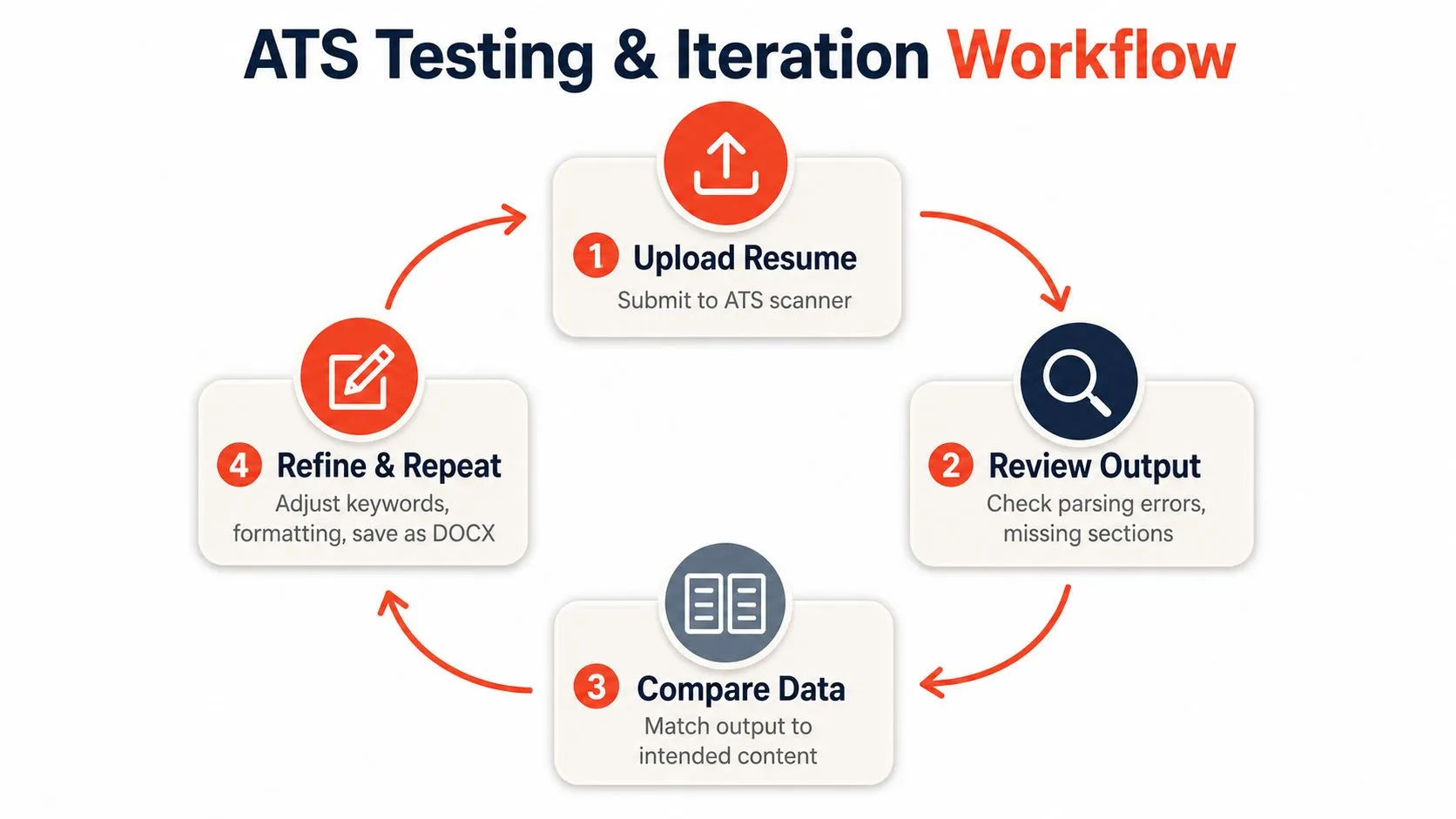
Upload the resume into an ATS checker or parsing preview, then inspect what comes out. Look for missing sections, broken dates, mangled job titles, and skills that disappear. If the parser can't read the resume cleanly, a recruiter probably won't either.
Fix the failures that matter
Start with the errors that break parsing. Misread dates usually come from odd formatting. Buried skills usually come from stuffing them into paragraphs or graphics. Broken section labels usually come from trying to sound clever instead of using standard headings.
Use a simple test cycle:
- Upload the resume.
- Review the parsed output.
- Compare extracted text to the job description.
- Refine and repeat.
If the resume scores low, fix the structure first. Remove decorative elements, move the strongest keywords into visible standard sections, and save the file as DOCX if PDF parsing looks unstable.
A low-scoring resume often improves with small edits. A two-column layout, hidden contact details, and vague section labels can be rebuilt into a single-column DOCX with standard headings and readable bullets. That kind of cleanup usually turns a confusing file into one that parses properly.
Don't optimize once and move on. Run the same check for every serious application.
The point is translation, not decoration. Clean structure gets you parsed. Relevant keywords get you matched. Honest tailoring gets you taken seriously. Do that consistently, and the ATS stops being a wall and starts acting like a filter you can clear.
If you want a faster way to turn your experience into a resume that reads clearly to both software and humans, use StoryCV. It helps shape your real work into a structured, ATS-compatible resume without turning it into keyword sludge.