
Median employee tenure in the United States was 3.9 years in January 2024, the lowest figure the Bureau of Labor Statistics has recorded since January 2002. Shorter stints mean more entries to rebuild, and memory keeps almost none of the details that matter: exact months, the legal name printed on the paycheck, the year your division got acquired.
There's no single database with your work history in it. There are overlapping records instead, and each one proves something different. Some prove dates and pay. Others prove scope and results. Treat them as one list and you'll either exaggerate or undersell.
So how do I find my employment history? You assemble it from four or five partial sources, in the order that costs you least. Get the facts straight first. Then turn them into something a hiring manager can read.
Which Records Prove Which Facts
Every employment-history question splits in two. What did I do, and when did I do it? The second part is paperwork, and paperwork is on your side. The first part needs memory, evidence and people who watched you work.
Here's the map I'd build before touching a single form.
| Source | What it proves | How to get it | Typical wait |
|---|---|---|---|
| Social Security earnings record | Employer names, addresses and annual reported wages for each covered year | my Social Security account online, or Form SSA-7004 by mail | Instant online; a mailed statement takes weeks |
| IRS Wage and Income transcript | W-2 and 1099 payers, taxable wages and tax years | IRS online account, or Form 4506-T by mail | Online account; about 10 business days by Form 4506-T |
| W-2s, pay stubs and tax returns | Exact employer, EIN, pay dates and wages | Old files, tax preparer or payroll portal | Immediate if kept |
| Offer letters and performance reviews | Job title, start date, duties, scope and promotions | Old email, HR portal or personal files | Immediate if kept |
| LinkedIn and old email | Titles, month and year ranges, projects and colleague context | Search your profile, sent mail and notifications | Immediate |
| Former-employer HR or payroll portal | Official dates, final title and sometimes wage history | Ex-employee login or a written request to HR | Days to weeks, so ask early |
| Background-check report | Employer names and dates as reported to screening firms | Request your file from the reporting company | Days, once the company pulls the file |
Two rules hide in that table. Government and payroll records prove dates, employers and wages. Personal documents and colleagues prove titles, scope and outcomes. Nothing on the list does both jobs.
The rule that saves the most time: never use a tax record to write an achievement bullet. It gives you a year and a payer, and nothing about what you changed.
Why one record is never enough
Social Security and IRS records are chronological, not descriptive. They rarely name a job title, and they don't record responsibilities, promotions or the systems you used. They also skip cash work, informal work, overseas employment and anything outside the covered system, which is a large slice of a real career.
That makes them a backbone, not a resume. Use them to fix the skeleton of dates and legal employer names, then leave the title, scope and achievement columns open until you've worked through your own files and a couple of former colleagues.
Work this table top to bottom this week. Start with the two free government records, because everything after them is easier once you know which years and which employers you're chasing.
Rebuild Dates and Wages From Government Records
The two records that anchor everything else are free, and both take longer to arrive than people expect. File them first, then work your own files while they process.
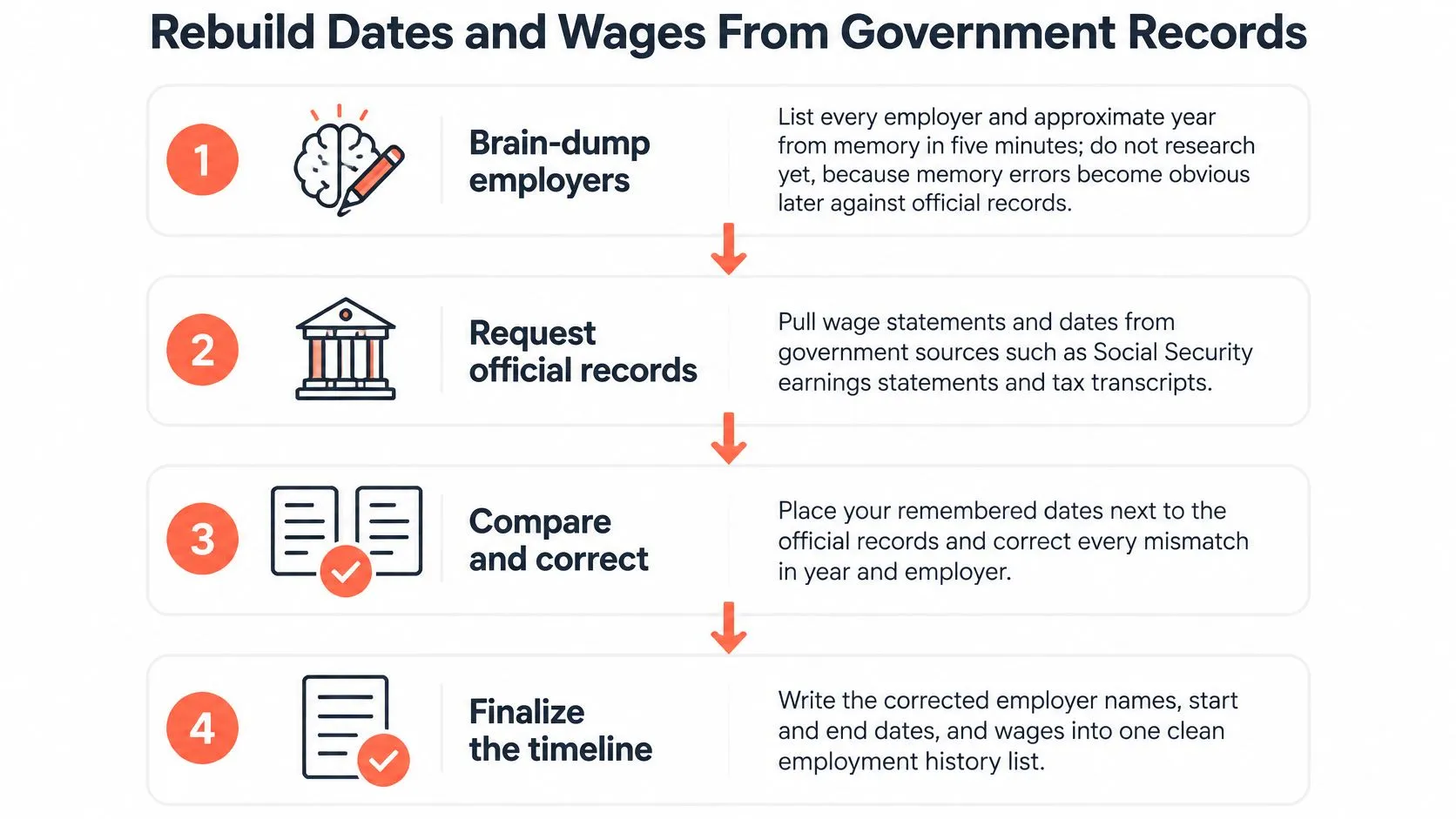
Here's the order that works, and the same sequence in one picture if you'd rather keep it on a second screen.
-
Brain-dump first, research second. Spend five minutes writing every employer and approximate year from memory, and don't open a browser yet. Your errors become obvious later against official records, and knowing where you were vague tells you which years to check hardest.
-
Open a my Social Security account. The SSA keeps earnings records for covered work and shows employer names, addresses and annual reported wages for each year, which is why the agency recommends reviewing it annually against your W-2s and tax returns. Errors usually come from an employer reporting the wrong name, Social Security number or wage amount, and the earnings-record rules in 20 CFR Part 404 set out how corrections work. If you'd rather deal in paper, file Form SSA-7004 for a mailed statement. It can take several weeks to arrive, so start it now rather than the week you need it.
-
Pull your IRS Wage and Income transcripts. They cover the current tax year plus the nine before it, and they show earnings reported by payers on W-2 and 1099 forms. The IRS is clear that a transcript may not contain every information document issued to you, so the IRS manual on wage and income transcripts is a strong second opinion, not a life ledger.
-
Merge both into one spreadsheet. Columns: employer legal name, trading name, location, start month, end month, job title, employment type, evidence source. Splitting legal name from trading name is what stops you listing the payroll processor as your employer.
-
Reconcile and correct. Flag years with no record, wages that look wrong for the role, and any name or number mismatch. Send W-2s or tax returns as proof and ask for the fix in writing.
If a year's reported pay looks low for the hours you worked, check it before assuming the transcript is wrong. Shift work and hourly roles are where records drift, and what counts as overtime pay is worth reading before you treat a short figure as your own mistake.
What these records leave blank
Coverage is the hard limit. Government earnings records only capture work reported through the tax and Social Security systems, so they can't tell a contractor from an employee, and some private-sector jobs never appear at all. A missing year on a transcript proves nothing about whether you worked. When a role falls outside what the records show, a call or written request to the former employer is the fix, not a second government search.
Outside the United States
If your career includes years abroad, the method holds and the first source changes. Check which trail applies before you start collecting anything, because the retrieval path depends on the country, the purpose and the type of work.
In the United Kingdom, file a subject access request with HM Revenue & Customs. It can return employment dates, earnings, tax payments and National Insurance contributions. Put the request in writing and name the exact years you need, since requests usually cover a defined period rather than your whole life.
Elsewhere, start with the national tax authority or social insurance agency and ask three questions. Does it keep employer-reported income year by year? How do you request a statement, by email or by post? Does it cover self-employment and contract work?
Some agencies answer by email in days. Others only accept a posted form, which is why you send it before you need it.
Whatever the country, the sequence is the same.
- List every employer from memory.
- Match each one to an official record.
- Fill the gaps with personal documents.
Only step two changes by jurisdiction. Keep the request narrow: ask for the years you need, not a full life history. A narrow request gets fulfilled faster and exposes less of your identity to a records office you'll never speak to again.
Dig Through Your Own Files and Digital Trail
The fastest evidence is already in your house. Before you pay anyone or chase a records office, spend an hour where the paper is.
- Tax folders and pay stubs. Old W-2s, year-end statements, benefits summaries, contracts and offer letters. If a tax preparer filed for you, they often keep copies for several years, so one email can recover a decade.
- Your email archive. Search for
offer,start date,welcome aboardandpayroll, then each company name in turn. Reread your sent mail from January, when W-2s arrive, and from the month you changed jobs. Calendar invites and expense reports confirm project dates. - LinkedIn and old notifications. Your own profile gives titles and month-year ranges. Dated recommendations and connection alerts that say you started a role help pin down months you've blurred.
- Payroll and HR portals. ADP, Workday, Gusto and Paychex accounts sometimes stay live after you leave. Even a dead login is useful, because it tells you which processor held your records so HR can find them faster.
- Achievement artifacts. Promotion letters, bonus notices, project wrap-up emails, conference bios and press mentions. These are the only documents that describe scope, and scope is what your resume is missing.
Tax records and pay stubs prove the skeleton. They never explain why the work mattered, which is the harder half of the job. The resume questions worth asking yourself are a good prompt list for pulling that back out of memory while the evidence is in front of you. And while you're still hunting, note the questions you can't answer about a role. Those are the ones an interviewer will ask.
File as you find
Create one folder per employer, on your own drive, and drop every dated artifact into it the day you find it. The timeline then assembles itself, and you stop rebuilding the same three years every time you apply.
Keep Your Identity Safe While You Search
Employment records are exactly what identity thieves want: legal names, dates of birth, employer names, partial account numbers. Treat security as part of the job, not an afterthought once the documents are gathered.
- Share the minimum. HR and screening firms need your legal name, your dates and the last four digits of your Social Security number. They don't need a full number, a passport scan or a bank account.
- Verify the requester. Real HR teams don't ask for full identity numbers by email. Check the sender domain, then call back on the number published on the company's own site, never the one in the message.
- Vet any instant-history service before you consent. Read what it collects, who receives it and how you delete it. Some services exist to sell your file onward, and you're the product.
- Keep identity documents out of resume tools. A resume helper needs your story, not your passport or payslip scans.
- Store the timeline and evidence folder in a password manager or encrypted drive. Redact employee IDs and account numbers before you send anything to a mentor or coach.
- Keep a copy of everything you send and every request you make. It becomes the paper trail if a record later turns out wrong.
This isn't paranoia. Illinois's 2025 workplace-privacy guidance requires employers using electronic employment-verification systems to follow set procedures when information looks inaccurate, including telling the worker about the discrepancy and allowing correction where the law requires it. Your best protection is a small, documented data trail you control.
Ask Former Employers the Right Way
Know who can confirm what before you send a single message. HR or the people team verifies dates and title in an official letter. Payroll confirms wages. A former manager confirms scope, projects and results, but that's a reference, not verification. Many companies now outsource the whole thing to a screening service, which you can query directly.
Then keep the ask small enough that a busy stranger can say yes in two minutes.
The HR letter. Subject: Employment verification request, [Full Name]. "I worked at [Company] as [Title] from [Month Year] to [Month Year]. Could you send a short verification letter stating my title and dates? I can share my employee ID or the last four digits of my Social Security number. I need it by [date]."
The manager ask. "Hi [Name], I'm rebuilding my work history and want to confirm the dates and scope of my [Title] role. Could we take 15 minutes this week? I'd also value your read on what we achieved with [project]."
For the phone, keep it to one line: "I'm a former employee verifying my dates and title for a background check. Could you confirm them, or route me to the right team?"
When the company no longer exists
Closed and acquired businesses are normal, and they're survivable. State unemployment records can confirm the employers and wages tied to a claim you filed. Former colleagues can swear to dates in writing. Archived press releases, old directories and your own tax documents fill the rest.
Etiquette does the heavy lifting here. One clear request, a stated deadline, and a short thank-you when it lands. Don't ask a manager for verification and a reference in the same message, because you'll get neither.
Fix Gaps, Errors and Unverifiable Roles
Almost every reconstruction hits at least one snag, and none of the ones below is fatal. What separates a clean timeline from a messy one is whether you fix the record or work around it.
| Problem | Why it happens | Fix |
|---|---|---|
| A job is missing from SSA or IRS records | Cash work, uncovered employment or a reporting error | Gather W-2s, pay stubs, bank deposits and contracts, then request a correction with evidence |
| Two roles merged into one entry | A payroll processor listed instead of the legal employer, or a staffing-agency assignment | Split the dates using offer letters and pay stubs, and name the agency as employer of record |
| Start or end dates look wrong | Year-end hires, late payroll setup or an imprecise "present" | Anchor to the offer letter, first and last pay stubs, and any termination letter |
| Freelance or contract work is missing | 1099 income leaves no HR record | List clients, invoices, 1099s and bank deposits, and treat the period as self-employment |
| A background report shows wrong dates or a merged employer | The data furnisher submitted incomplete information | Dispute in writing with both the reporting company and the employer, and keep delivery confirmations |
| The company no longer exists | The business closed or was acquired | Use state unemployment records, W-2s, tax returns, archived press and former colleagues |
How to dispute a screening report
Under the Fair Credit Reporting Act, employment-screening companies must use reasonable procedures for maximum possible accuracy, disclose your file on request, and investigate disputes about incomplete or inaccurate information. The Consumer Financial Protection Bureau's guidance on background dossiers notes that firms like The Work Number and HireRight give consumers access to their files.
Request the report, compare every employer, title, date and reason for leaving against your primary evidence, then dispute in writing to both the reporting company and the employer that supplied the data. Keep the delivery confirmations and the corrected report.
Government corrections work the same way. Send W-2s, tax returns or pay stubs to Social Security or the IRS and ask for the entry to be fixed, rather than explaining the discrepancy in an interview.
The honesty rule: correct facts with evidence, label gaps truthfully as caregiving, study or contract work, and never invent an employer to smooth the line. Interviewers forgive a gap. They don't forgive a fabricated one.
When the dates do get contested, matching your resume to the record matters as much as the record itself. How to format resume dates consistently is worth five minutes before anything goes out.
Turn the Timeline Into Your Career Story
The deliverable is one page, one row per role: employer, title, start and end month, a one-line scope statement, two proof points, and an evidence status of verified or estimated. Keep the evidence folder for at least five years, and make every resume, application and background-check answer agree with that page.
Dates are the easy half. The harder half is describing what those years consisted of, which is where most senior people undersell themselves.
That's the part StoryCV handles. It interviews you about each role, asking what you owned, what you changed and what happened next, then turns your answers into clear bullet points you can drop into your own template. Your Career Story saves every answer, so the next application starts from earlier work instead of a blank page. How to write the professional experience section covers where those bullets land.
You're not under-qualified. You're under-described. Spend twenty minutes tonight on the from-memory employer list, and the rest of this gets easier from there.
You've got the dates and the employers. Now get the story out of your head, because that's what gets read. StoryCV interviews you role by role, turns your answers into resume bullet points, and keeps your Career Story ready for the next application. It's free to start, and the free start includes two finished bullet points, so begin at StoryCV.