The most repeated advice about Resumeio alternatives is to count templates and chase an ATS score. Both tests are noise.
A builder sells you a layout. It can't sell you the sentence that proves you ran the migration, cleared the backlog, or held the client through the outage. That sentence is the thing a hiring manager reads, and it's the thing most tools never ask you for.
So compare on three things instead: whether the file survives a parser, whether you get a usable export without a paywall surprise, and whether the tool pulls evidence out of you or just hands you empty boxes to fill.
You're not under-qualified. You're under-described. Almost every resume problem starts there.
Resumeio Alternatives Compared on Six Criteria
Resume.io's free tier is a demo, not a working plan. It holds one resume and one cover letter, and it caps the download: unlimited PDF exports sit behind premium, along with unlimited documents, premium templates and colors (Resume.io pricing). The free account does let you build, share an online link, edit later and use the job-search tool, but a second role version or a PDF outside the single free template means upgrading (Resume.io help center).
Premium bundles more than editing. The plan lists a Job Tracker, AI Interview Prep, a First 90 Day Plan, and Career Pathways, and six-month and annual plans are one-time payments that don't auto-renew, so the account later drops back to free. Pricing can also vary by location (Resume.io subscription details). Pay for that bundle only if those are tools you'll open.
Resumeio alternative criteria against the Resume.io benchmark
| Criterion | Resume.io benchmark | What to check on an alternative |
|---|---|---|
| Free plan | One resume and one cover letter | How many role versions you can make free |
| Download format | Free PDF only in the Vancouver template, or TXT; unlimited PDF on premium | Whether you get a clean PDF and plain text without paying |
| Template count | Over 30 recruiter-tested templates on premium | Whether the layout stays simple enough to parse |
| Bundled tools | Job Tracker, AI Interview Prep, First 90 Day Plan, Career Pathways | Whether you will actually use the extras |
| Renewal | Six-month and annual plans are one-time payments that do not auto-renew | Whether the plan renews on its own |
| Evidence capture | Not published | Whether the tool asks about scope, actions, and outcomes |
That last row is the one that separates a template shop from a tool that interviews you. No builder publishes a number for it, because nobody measures how well a piece of software turns a vague job description into proof.
If you're weighing where to spend money on your career this year, a tool is only one option. Executive coaching approaches and formats lays out what the human version looks like and what it delivers, which makes the trade easier to judge. Our side is flat: no hidden fees, upsells, or hourly charges.
Start with a count. How many role-specific versions will you need this month? If it's one, the free plan covers you and you can stop reading reviews.
Why Parsing Beats Templates for ATS Readability
A parser doesn't see your design. It sees text it can map to fields, and anything it can't map is gone.
A 2025 study of resumes from blind and low-vision job seekers found ATS software correctly read about 84% of resume content on average. Chronological and combination formats reached about 88%, while functional resumes fell to 55% (Mississippi State resume readability study).
Resume format and average ATS readability
| Resume format | Average ATS readability | Use it when |
|---|---|---|
| Chronological | about 88% | Your titles and employers follow one clear line |
| Combination | about 88% | You changed direction and need your skills up front |
| Functional | about 55% | Avoid it as your main layout |
| All formats, average | about 84% | You need a benchmark for judging your own file |
The sample was accessibility-focused resumes, so read those percentages as directional, not as a promise about the system your target employer runs. The direction is still clear enough to act on.
The only test that matters
Forget an abstract score. The test is field-level survival: job title, employer, dates, skills, education, and achievement bullets all have to come through as structured text.
A handsome two-column template that scrambles the order fails that test no matter how good it looks in a preview. We write plain-text bullet points precisely because parsing systems read them without trouble, and a clean narrative on top of a broken file helps nobody.
Pick the format that matches your career line, then build inside it. If your titles and employers tell one continuous story, go chronological. If you're changing direction and need the skills up front, go combination. Functional as your main file is a 55% bet, and you don't need to make it. For the mechanics of how screening software reads a file, the ATS explainer walks through it step by step.
How to Build an ATS-Friendly Resume Step by Step
Seven steps, in order. Each one carries its reason, because a step you don't understand is a step you'll skip on a busy Tuesday.
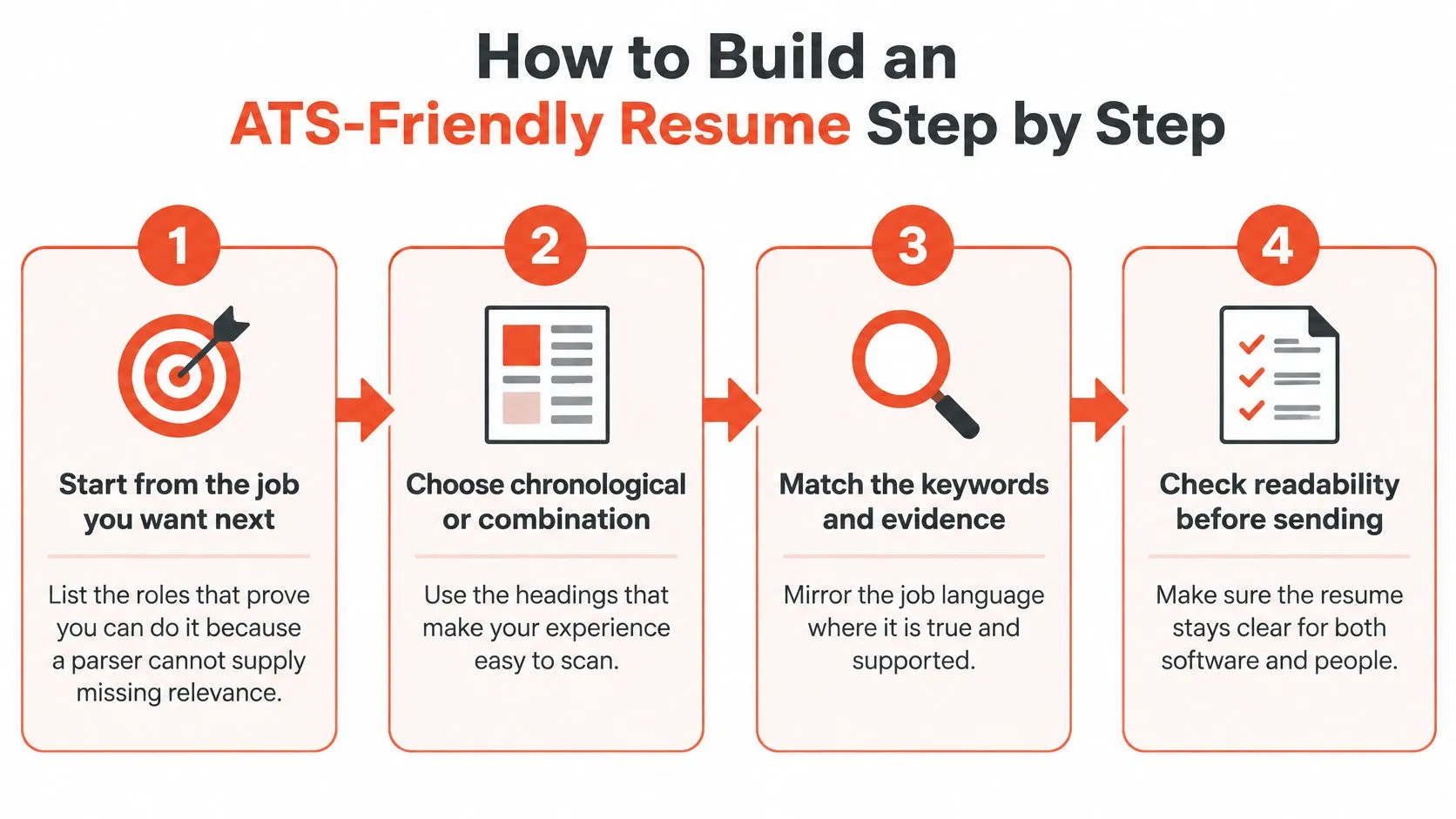
That's the short version. Here's the working version.
-
Start from the job you want next. List two or three roles that prove you can already do that job. A parser can rank what's in the file, but it can't supply relevance that isn't there.
-
Choose chronological or combination, then use standard headings. Experience, Skills, Education. Nothing clever. A heading the system has no field for is a section that may never be read.
-
Give each role its own lines. Job title, employer, city, and dates, each on a separate line, because those are the exact fields a screen stores and matches.
-
Write each bullet as problem, action, result. One per line. Add a number only when you have one, since a guessed figure is a liability you'll be asked to defend.
-
Place keywords where the work happened. The title line, the bullet that proves the skill, the skills block. Not a hidden block of text at the bottom.
-
Keep one column and plain text. No text boxes, no icons, no logo, no image-only PDF. Every one of those is a place where your best bullet disappears.
-
Export a text-based file and audit it. Paste the file into a plain text editor and check that every role, date, and bullet is still there, in order. This takes two minutes and catches the failures no score will warn you about.
You'll notice step seven is the only one that tells you the truth about your own file. Do it every time.
How long this actually takes
People usually finish a full resume in 1 to 1.5 hours once the evidence is written down. The bottleneck is never the formatting, it's remembering what you did and why it mattered.
Full formatted export is planned on our side. For now, you copy your finished bullet points into your own resume template, which keeps you in control of the layout your industry expects.
Where Keywords Go and Where They Do Not
Keywords belong where you can back them with a result. Anywhere else they're decoration.
Read the posting and circle the nouns: tools, methods, outcomes. Then keep only the ones that match work you did. That's the entire selection process, and it takes five minutes.
Placement follows the same logic:
- The title line of each role. Mirror the employer's language where it's accurate, so a screen matching a job title finds yours.
- The first two bullets of each role. That's where a reader decides whether to keep going.
- The skills section. Short, plain, no ratings bars.
- A summary, if you use one. Two lines, no adjectives.
Say the posting asks for stakeholder management. The keyword alone is a claim. The bullet that shows the stakeholders, the conflict, and what you resolved is proof.
The rule: a keyword you can't prove is a question you'll answer in the interview, unprepared.
Two mistakes waste the whole effort. Copying a job posting into a hidden text block, which reads as manipulation when a person finally opens the file. And listing forty skills with no evidence behind any of them, which reads as padding.
Skip the words that carry no information: results-driven, passionate, dynamic, team player. A recruiter can't do anything with them. If your resume needs help choosing and placing terms for a specific posting, this guide to optimizing a resume for ATS covers the selection end in more detail.
Achievement Bullets That Still Sound Like You
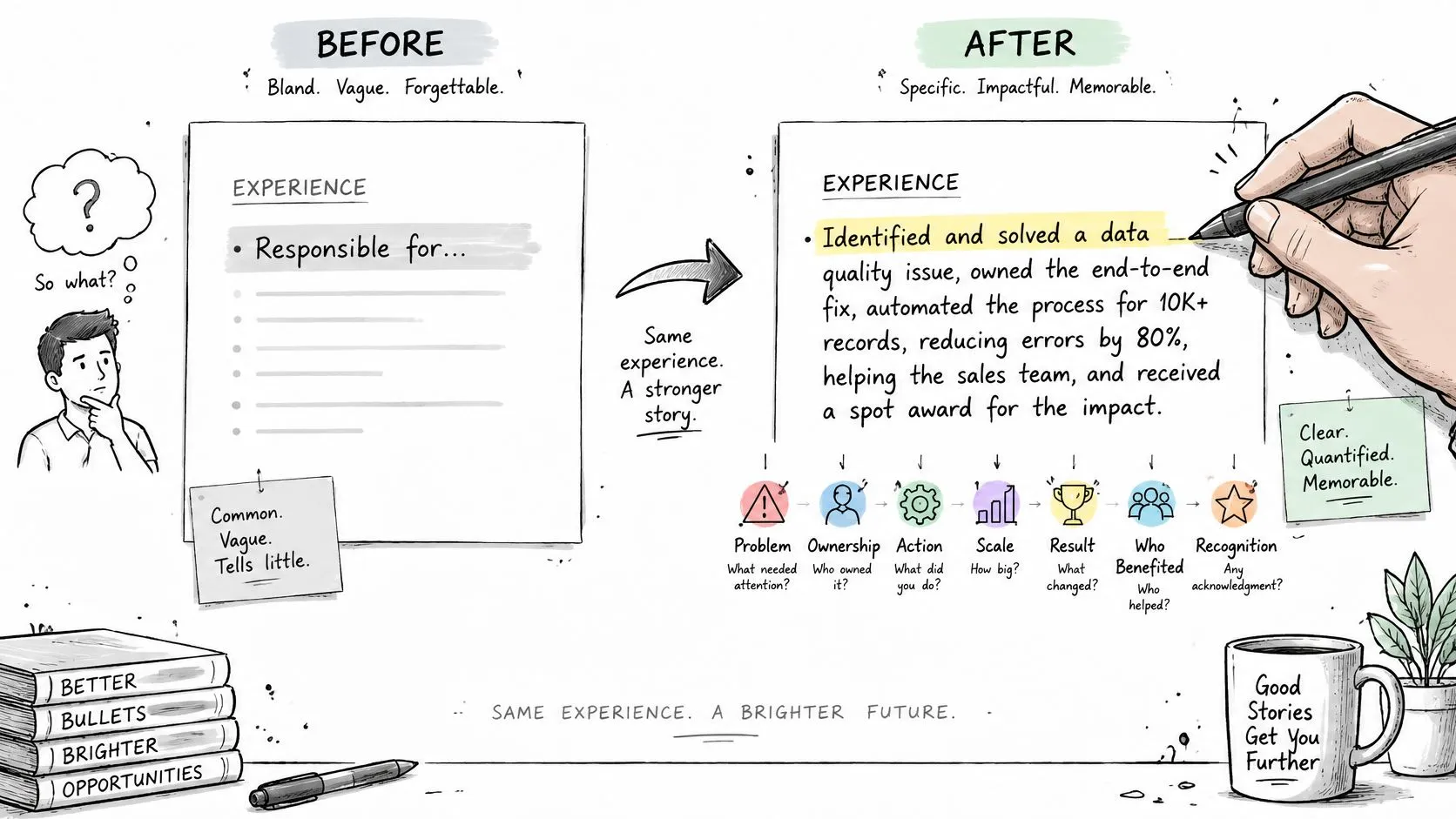
Most bullets report activity and skip consequence. "Responsible for system improvements" is true, and it tells a hiring manager nothing about whether to call you.
Rebuild it by adding seven signals, one at a time: problem, ownership, action, scale, result, who benefited, recognition. Those are the same seven things a good interviewer listens for in a human conversation, and they're what a weak line is missing.
Start here:
Responsible for system improvements.
Add the problem and the action: rebuilt the retry logic behind the nightly billing batch. Add scale and result: failures dropped from 14 a week to 2. Add who benefited: the support team got several hours a week back.
Cut nightly billing batch failures from 14 a week to 2 by rebuilding the retry logic, which saved the support team several hours a week.
Same job. Different candidate.
Where the numbers come from
Every number has to come from your own answers. That isn't a style preference, it's a survival rule.
A made-up percentage is worse than no number at all. It invites a question you can't answer.
Employers are already scanning for the generic version. A 2025 survey found 73% of employers said AI-generated resumes are easy to spot, while 65% said they use AI somewhere in the hiring process (iHire 2025 State of Online Recruiting report). The help that survives scrutiny is an interview that pulls scope and outcome out of you, not a paragraph you'd never say out loud.
And the bullet only starts the proof. In 2024, 70% of hiring professionals in a HireVue study said they prioritized skills assessments over resumes (Raconteur on skills-based hiring). Your resume gets you to the assessment. It doesn't replace it.
One pattern, three bullets
For a single role, write three lines this way. Scope: what you owned and how big it was. Decision: the call you made and the tradeoff you accepted. Result: what changed, measured, and for whom.
We listen for those seven signals and nothing else, and every figure in the finished bullet comes from what you told us. For more before-and-after patterns across roles, these resume bullet point examples show the same rebuild in other functions.
Then run the voice test. Read each bullet aloud. Cut any line you wouldn't say in the interview, because you'll be asked to.
ATS Pitfalls That Quietly Cost You Interviews
There's a confidence gap worth naming. In 2025, 64% of 517 U.S. job seekers surveyed by LiveCareer felt confident their resumes could pass applicant-tracking-system screening, while only 10% believed nearly all their applications were reviewed by a human recruiter (CFO Dive on the LiveCareer survey).
Read that twice. A parser reading your file is not a person reading it. Clearing the software buys you a place in a queue, nothing more.
Common ATS pitfalls, what they break, and the fix
| Pitfall | What the parser misses | Fix |
|---|---|---|
| Text in headers or footers | Name, contact details, or dates can drop out | Move everything into the body of the document |
| Tables, columns, or text boxes | Bullets read in the wrong order or disappear | Use one column and standard headings |
| Icons, logos, or charts | Skill ratings and symbols carry no searchable text | Replace them with plain words |
| Scanned or image-only PDF | Nothing in the file is readable | Export a text-based PDF and check it by pasting it into a plain text editor |
| Creative section names | The section can be skipped | Use Experience, Skills, and Education |
Run the audit once, at the end, on the actual file you plan to send. Paste it into a plain text editor and look for missing names, dates, and bullets. Whatever vanished there will vanish in the system too.
Fix the file before the keywords
Order matters. A parser that never captures your job title can't pass your strongest bullet to anyone, no matter how well you matched the posting's vocabulary. Repair the structure first, then worry about phrasing.
Keep each fix to one action. Move the contact block out of the header. Rebuild the layout in a single column. Retype the skill list as words. Every one of those takes minutes and removes a silent failure.
Resume.io vs StoryCV by Career Situation
There's no single winner here, and anyone who tells you otherwise is selling something. Four situations, four verdicts.
You need several role-specific PDFs and a template library. Go with Resume.io premium. Unlimited PDFs, over 30 templates, and a Job Tracker are a real package for someone applying in volume who wants layout control. What you give up is a guided pass over what the work meant.
You're changing careers, returning after time out, or leaving a title that hides your skill. Choose StoryCV. The interview pulls out what your job title doesn't say, and the bullets come from your answers rather than a template prompt. Nearly two-thirds of employers in NACE's 2025 entry-level survey reported using skills-based hiring, and fewer than 40% screened candidates by GPA (NACE 2025 Job Outlook). Proof of skill beats a tidy title line.
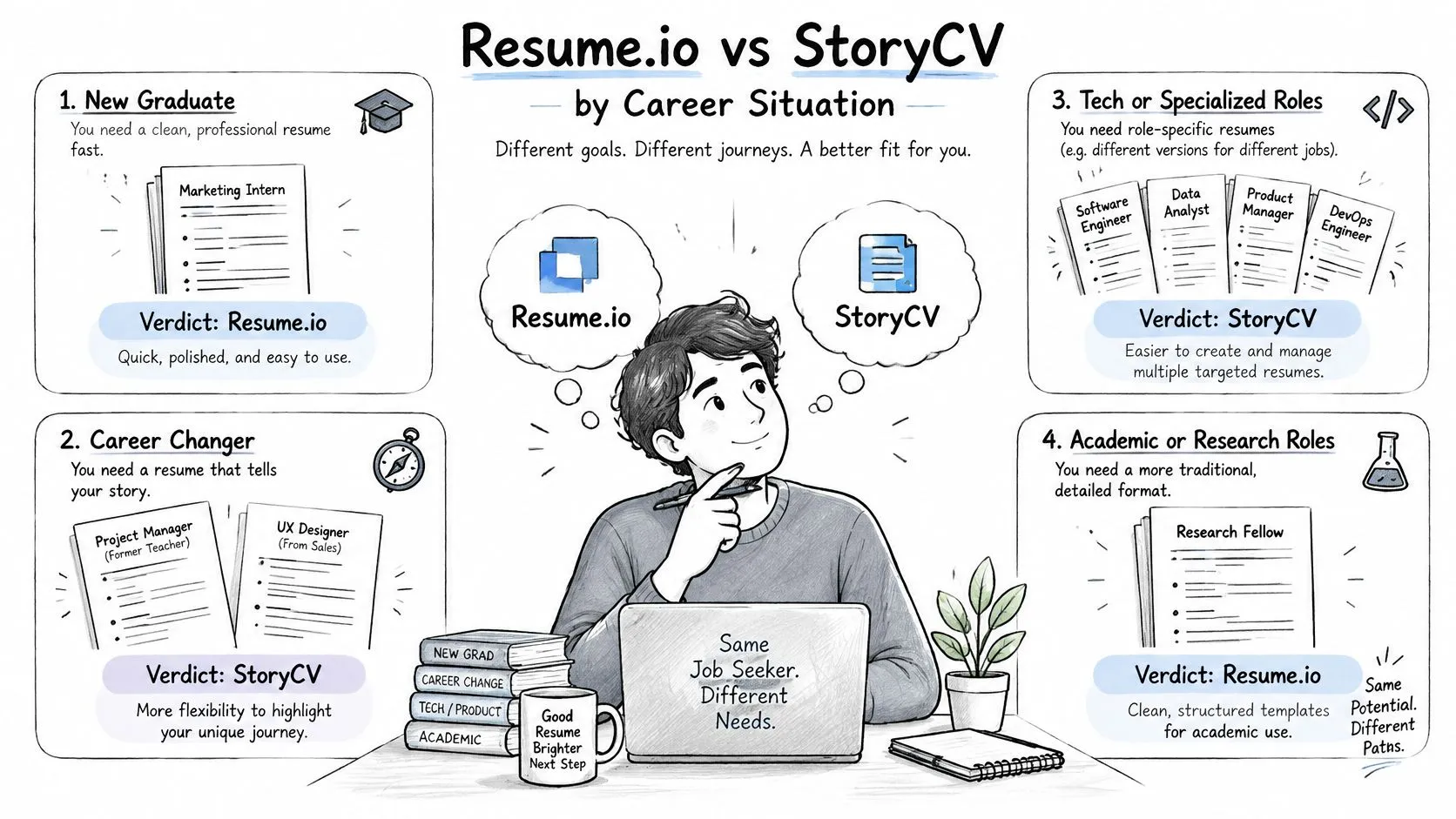
You have one clear career line and need a single resume. Start on Resume.io's free plan. One resume, one Vancouver PDF or a TXT file. Pay only when you need a second version, because you probably won't the first week.
You're applying widely from the same body of work. Stay with StoryCV. The Career Story keeps everything you've said, so the next version starts from earlier answers instead of a blank page. Resume.io's advantage in that scenario is layout control and bundled tools you may never open.
The trade, in one sentence
The builder gives you format control. The interview gives you more of your own story and less control of the template. Decide which one is costing you interviews right now.
We built the second thing for people with complicated paths, including career changers, military transitions, and people coming back into the workforce. You can start free and get two finished bullet points before you decide anything.
Before you pay either product, write one role in full: scope, action, outcome. If you can't do it in ten minutes, no template will fix that, and a guided interview will.
StoryCV interviews you about the work you've done, asks the follow-up questions you'd never think to ask yourself, and turns your answers into bullets you can defend in an interview. Your first two finished bullet points are free, and every number in them comes from something you said. Go to StoryCV and write the one role your resume has been underselling.